Author: Raghu

  • Privacy Yearly Update – 2020

    Privacy Yearly Update – 2020

    I started a journey of caring more for my privacy almost 2 years ago. Last year I wrote a series on what that journey was. If you haven’t read that series, here’s the final post on the series which has links to all the posts in the series.

    As I concluded that series, I realized that caring for privacy is going to be a life long journey. As Big Tech spreads their tentacles wide and far and we increase our dependency on digital tools (including education for our children), it is important to continue to make privacy focussed decisions on a continuous basis.

    So I thought I will publish a post every year summarizing some of the additional steps that I took, what worked and what didn’t.

    Here’s the update for 2020.

    De-Googling

    This has been harder than I thought. Here’s where I stand.

    GMail

    I still have to use a bit of GMail even though I switched to ProtonMail as my primary email. This is primarily due to few banks and government websites that make it extremely hard to change email addresses on them without either filling a form or visiting them in person. So, this is still a work in progress and hopefully by end of 2021 I can get rid of GMail.

    YouTube

    Another difficult service to get rid off. Primarily because a whole lot of content that I consume is out there only. Tech review videos, shows (like US Late Night shows), movie trailers are still pretty much YouTube only. So I still do spend time on YouTube but with few tweaks on my behavior:

    • I have reduced usage on my mobile drastically and have restricted all the permissions that the app asked for. I am also not “logged in” – though I am pretty sure Google’s algorithm still knows about me with other data they can collect 🙂 I just get some pleasure thinking that I make it difficult for them 🙂
    • On the desktop, again, I am not logged into Google by default. I also implement a strategy using “Containers” – which I will talk about later in this post

    Google Search

    I have eliminated this to about 95%. I have been using DuckDuckGo as my primary search engine for more than 18 months now and I have been fine. Except when it comes to some local search – such as looking for local shops. Google still does an amazing job with local search and I am hoping DDG gets better over time.

    Here’s one surprising thing though: I still see people in the tech world showing some surprise when they see me using DDG (like “Oh! you use DDG”). Sometimes they also make fun when DDG shows some irrelevant search result while Google picked it up better.

    For all those folks: DDG is fine 90-95% of the time. You will be able to find what you are looking for most of the time. It’s just your habit that needs a bit of change and like I mentioned above, you may still not be able to leave Google Search completely. It’s perfectly OK to use multiple Search Engines.

    Google Maps

    Oh boy! This is the hardest one. They just nailed it here and I still use it as my primary navigation app. Sometimes I also use it as a Search Engine to find address/phone numbers of businesses (when DDG doesn’t give good results).

    I am on iOS and haven’t given Apple Maps enough time and attention. I am going to take that up as an action item for 2021 and see how it goes.

    If you have been using Apple Maps in India, please let me know in the comments about your experience.

    Google Pay / GPay

    Nope. I don’t use it at all. Almost everyone in my close network of friends and families use it and they all have told me how easy and simple the experience is. To all those people – I just view GPay as Google’s way of knowing you better in the offline world. So that they can serve better Ads in your online world.

    It was pretty hard to live without GPay during the pandemic days where almost every business or even individual told me this: “Can you GPay?”. When I say I don’t use the App, I am being seen as old as dinosaurs. I have resisted so far and I hope I can continue to live without it.

    Other Google Products

    Apart from these, I don’t use any other Google product.

    No to Google Photos, Hangouts (is it Meet?, Duo?, whatever), Calendar, Google App.

    None of their other apps are installed on my phone.


    Tools

    Here are some more tools that I use on a daily basis.

    Disposed containers in Firefox

    I use Firefox Multi-account Containers heavily. I have created a “Dispose” container and have set “YouTube” to be opened only on this container. I also delete and recreate this container once in couple of weeks.

    The reason I do this to make sure YouTube’s algorithm doesn’t get me in to a rabbit hole of watching more and more videos through their recommendations and continue to serve more and more Ads.

    I don’t know if it really helps in reducing how much YouTube tracks (given I am also not logged into Google). I will always believe Google’s algorithms are far more sophisticated. But at least this method of using Disposable containers reduces the time that I spend on YouTube.

    uBlock Origin

    I use this Firefox extension to primarily block Ads and trackers. The default list that they provide is good enough. I am yet to experiment with some additional lists that the community has built.

    Behaviour Related

    I also took some actions to modify some of my behaviors to reduce my digital footprint overall (which can indirectly provide better privacy – if you don’t provide enough data, you don’t have to worry about it :))

    • Uninstalled vast majority of apps from the phone. No shopping apps (Amazon, Flipkart, etc..). No social apps (Twitter, LinkedIn, etc…). I do have Twitter installed on my laptop but I set a specific time of the day to look at Twitter for few minutes
    • Turned off location access to all other apps. In iOS you can choose “Allow Once” whenever location is required when using an app (such as Google Maps)
    • Turned off Notifications for almost all the apps. Especially Whatsapp. I know what you are going to ask next – What if there was some urgent message? They will call 🙂

    The Big Privacy Related News of 2020

    Whatsapp

    I know! You don’t want to hear or discuss about this topic anymore in your life. I leave it to your own best judgement to decide for yourself. But I thought I will summarize some of the objections or feedback that I received on switching from Whatsapp to an alternative.

    • The top feedback: I don’t want to install another app (from people who have 200 apps on their phone :))
    • What’s the guarantee that the alternative doesn’t do what Whatsapp is doing today? (sure, that’s why you got to pick a sane one and be ready to switch out of that in future. If they have a paid model, you should pay them to make sure they aren’t pressurized to monetize your data)
    • How does this matter in a country like India where all insurance providers call me (with my fully policy details) exactly few days before my insurance renewal? (I am with you buddy. Let’s chat on Whatsapp :))
    • I saw the prompt by Whatsapp for 5 seconds and accepted it already (!!!)

    Jokes aside, here are my personal takeaways:

    • Whatsapp isn’t going anywhere. But at least this created a bit of more awareness. I am happy that some of the groups that I am in took this opportunity to switch
    • It is important for us to realize that it’s perfectly OK to use multiple apps. Especially when we are having private conversations. If we are beginning to get uncomfortable with an app, we should swith to another. And that’s OK
    • So many people that I know (who work in tech) are OK with what Whatsapp wanted to do. They didn’t understand that the change was for user-to-business communication and thought it was for all communication that happens in Whatsapp. And they are still OK with it too (even after seeing that comparison screenshot of data collected by different messaging apps). If something like this doesn’t shake them, I wonder what will

    Apple’s App Privacy Labels

    This is what probably led to the huge Whatsapp controversy. Apple now requires every App developer to report what data is being collected by the App and how its being used. If you visit the App’s listing page on the AppStore, you will see info about what data the app is collecting.

    Here’s what Facebook has reported (I am assuming they just did a “Select All” :))

    Facebook’s App Privacy Label

    It looks like it’s upto the developer to report what data they are collecting (I am hoping Apple is able to audit as part of their app review process). But it does bring in better transparency and users can make an informed decision while installing an app.

    Btw, Google hasn’t yet provided privacy details as of publishing this post (end of January 2021). Here’s the screenshot of the Google app (and pretty much the same case for all of their iOS apps)

    Google iOS App’s Privacy Label

    Well that’s the update for 2020. And hope 2021 brings in more privacy (and more time out of our homes) in our lives.

    Thanks for reading. Let me know your thoughts in the comments section.

  • Centralized Column Level Permissions in Data Lakes

    Almost every organization has a Data Lake today in some form or the other. Every cloud provider has simplified the process of building Data Lakes. On AWS, you can start having one with just these simple steps:

    • Create a S3 bucket
    • Ingest data into the S3 bucket (through Kinesis Firehose, APIs, etc…)
    • Use a Glue crawler to crawl that data and populate metadata in the Glue Catalog
    • Use Athena to start analysing the data through SQL

    With the above steps, you have data flowing into your Data Lake and you address few use cases. Once the above setup is in place, quickly the Data Lake would start collecting a lot of data. On the other hand, different folks in your organization would start accessing this data. And sooner than later, if you are the owner of this Data Lake, you start worrying about one big challenge.

    Data Access Control in Data Lakes

    As different users in your organization access the Data Lake, how do you implement “Access Control” mechanisms in your Data Lake? So that people with the right permissions & clearances can only view certain sensitive/confidential data.

    Let’s say your Data Lake holds customer information. You need to hold PII information such as email address and phone numbers for your marketing automation. At the same time, you do NOT want your Data Analysts to have access to this information (let’s say their typical use cases do not require access to email address and phone numbers).

    This has been addressed in Databases for many decades now. You implement “Access Control”. In Databases, you define fine grained permissions (typically through GRANT) on who can access what data.

    So, how do you implement something similar to a Data Lake? And more importantly where do you implement this access control?

    Access Control Permissions at the Data Catalog

    One of the key attributes of a Data Lake is the ability to use different tools to process & analyze the same data. Your Data Lake users could be using a SQL based tool today for some adhoc analysis and would later switch to running a Spark cluster for some compute intensive workload.

    So, you could implement Access Control at the individual tool level. For example, if you are using Amazon Athena and AWS EMR, you could implement permissions in these services to control who has access to the data being analyzed through these services.

    However, a better and scalable alternative is to implement the Access Control permissions at the Data Catalog level. This provides us the following advantages:

    • All the services that your Data Lake users use to process data leverage the same underlying catalog. And permissions are maintained there
    • The permissions are implemented centrally and can be managed at one place instead of duplicating at many services. Whenever users no longer need access to your Data Lake, you can delete their access at one place
    • You get a single view of who can access what. Simplifies audits

    Implementing Centralized Column Level Permissions in AWS Data Lakes

    Let’s look at how to implement a centralized column level permissions in AWS Data Lakes with an example.

    Sample Data

    I have got the New York City Taxi trip record data set in my S3 bucket. It’s organized month wise as below. This is a public dataset available here: https://registry.opendata.aws/nyc-tlc-trip-records-pds/.

    New York City Taxi trip data

    Create a Database using AWS Lake Formation

    Head over to AWS Lake Formation and create a Database that will hold the metadata. For instructions on how to create a database, check this documentation: https://docs.aws.amazon.com/lake-formation/latest/dg/creating-database.html

    Create a AWS Glue crawler to populate metadata

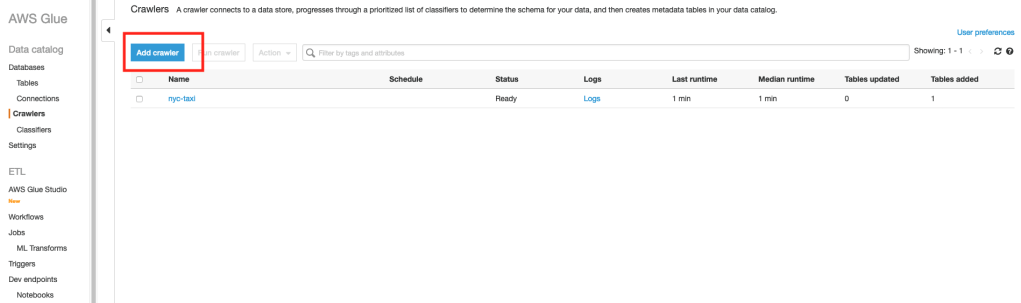
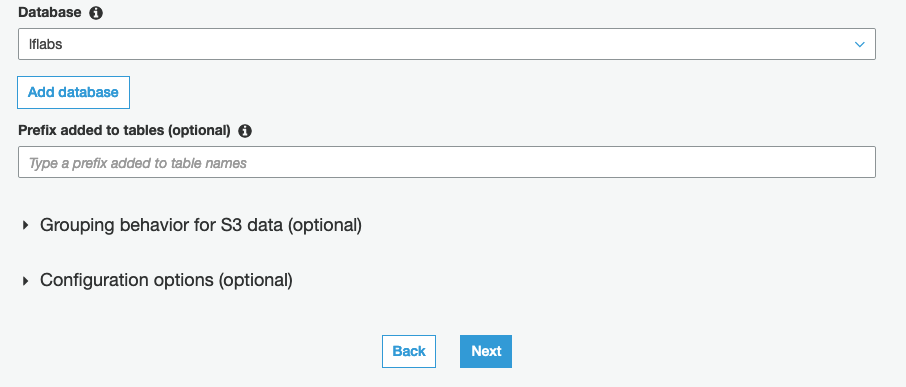
    The next step is to create a Glue crawler, crawl the sample data and populate the metadata in the Lake Formation database that we created earlier. Check this documentation https://docs.aws.amazon.com/glue/latest/dg/console-crawlers.html for instructions or follow the step by step instructions in the Glue Console.

    When you create the crawler, provide the Lake Formation database that you created earlier as part of the Crawler’s output configuration.

    Once the crawler completes, go back to Lake Formation console and you should see a table created under “Tables”. Here’s a screenshot of my Lake Formation table. Your’s should look something similar.

    Here’s the table schema as discovered by the Glue crawler.

    Restricting access to few columns

    Let’s say, out of the above columns, we do NOT want regular users of our Data Lake to view the “fare_amount” and “total_amount” columns.

    For this purpose, I have created an IAM user called “dl-demo-user” for whom I would like to restrict the above two columns.

    1. In AWS Lake Formation, select the table that was populated by the Glue crawler
    2. Click on the Actions menu at the top and select the Grant option

    In the next screen, provide the following inputs:

    1. Select the IAM user(s) that you would like to restrict access. I chose the “dl-demo-user” that I created specifically for this demo
    2. In the “Columns” drop down, choose “Exclude columns
    3. Select the “fare_amount” & “total_amount” in the “Exclude columns” drop down
    4. For Table permissions, choose “Select

    That’s it.

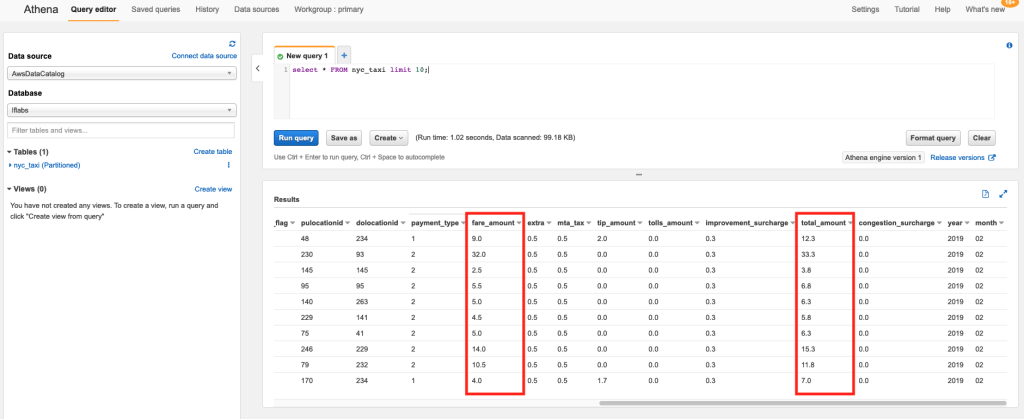
    Now, I log in as the “dl-demo-user” and head over to Athena to execute the following query:

    select * from nyc_taxi LIMIT 10;

    The Athena query results no longer show the “fare_amount” and “total_amount” columns.

    If the same user were to use AWS EMR or Quicksight to access the same data, the user will NOT have access to the above two columns.

    However, when I run the same query using a different user, the query results include the “fare_amount” and “total_amount” columns.

    Viewing Data Permissions

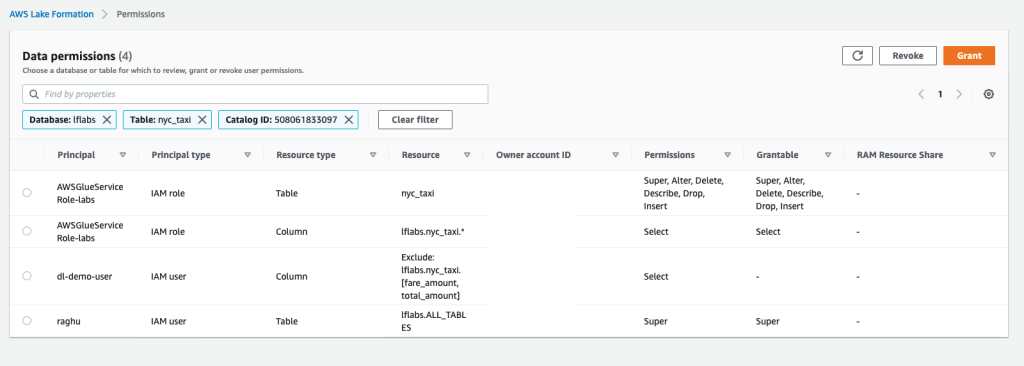
    You can also use Lake Formation to get a single consolidated view of permissions across all users of your Data Lake.

    Click on “Data Permissions” from the left menu of the Lake Formation console to view all permissions. You can also use the “Grant” and “Revoke” buttons at the top to manage permissions from this page.

    Conclusion

    Implementing column level permissions is an important requirement for many organizations. Especially if your data lake consists of sensitive data (such as customer, sales, revenue), you would definitely have requirements to restrict access to certain fields only to few folks who have the necessary clearances.

    Such permissions when implemented at the Data Catalog level provides the following advantages:

    • Users of your Data Lake can continue to leverage different services like Athena, EMR, Glue, Quicksight to analyze the data
    • From a Data Governance point of view, you can manage permissions centrally at the Data Catalog level using Lake Formation
    • Permissions from Lake Formation automatically federate across all services without the need to duplicate it at each service
    • Whenever you need to add/delete users of your data lake, you get to manage it at one place

    Hope this article provided some ideas on how to implement column level permissions for your Data Lakes on AWS. What are some other tools/techniques that you use to implement the same? Do share them in the comments below.

  • Hey! (Cloud)Watch out those logs!!

    Time and again public clouds really prove that if you got to scale rapidly, there is no better place on earth you can. This time, it was the new email service Hey from the creators of Basecamp. Here’s an execellent write up from the company on how AWS helped them scale rapidly when they got way too much attention to their product.

    However, one interesting thing that struck me was this statement:

    Another gotcha: some services can rack up bills when you least expect it, like CloudWatch Logs. It integrates so easily with EKS! It’s just one button to click! And then you’re looking at your bill, going “where did this extra $50-$60 per day come from?”

    CloudWatch Logs allows you to ingest logs from various sources (your EC2 Instances, Containers, Lambda functions, tons of AWS services), store them centrally, analyze and gain insights. It’s a great service and anyone who has managed log aggregation at scale would appreciate the service a lot.

    It is also pretty easy to turn on this service. AWS has deeply integrated CloudWatch Logs with a whole lot of its managed services (such as VPC Flow Logs, EKS Control Plane logs). For serverless services such as AWS Lambda, API Gateway, CloudWatch Logs is the only mechanism to collect logs.

    However, one of the key challenges with CloudWatch Logs is how expensive the service can turn out to be.

    There are two aspects to CloudWatch Logs Pricing:

    • Ingestion Cost – at $0.5 per GB of log ingested
    • Storage Cost – at $0.03 per GB of logs stored

    Ingestion Cost

    Ingestion cost, while seems reasonably priced at the first glance, typically becomes a major line item in your bill. On a reasonably busy application/service, this can easily become 1000s of dollars every month.

    From AWS perspective, there is a good rationale to price it at $0.5 per GB. Ingestion means AWS needs to provision enough compute resources to capture all those logs being pushed to the service.

    When sending logs to CloudWatch Logs is as simple as selecting a checkbox, it is virtually impossible for customers to think about how much they would end up paying for it. Think about VPC Flow logs – its just impossible to predict what the volumes could be.

    Sure, over time one can begin to understand some trends between RPM and Log Ingestion rates. However, in practice, I have only seen developers focussing on optimizing CloudWatch logs only after someone at the top (typically who looks at the bill every month) brings the high costs of CloudWatch Logs to their notice.

    Storage Cost

    The storage cost is definitely much cheaper when compared to the ingestion costs. As you can see, it is priced similar to Standard S3 pricing because the logs are internally stored in S3.

    However, one major gap that people discover later is that the default configuration of Log Groups is to store the logs forever. Here’s the relevant documentation that talks about the default retention policy.

    So, its entirely left to the customer to figure this out and change the retention policy (and most customers figure this out only when they see a spike in their bill).

    AWS Console Behavior

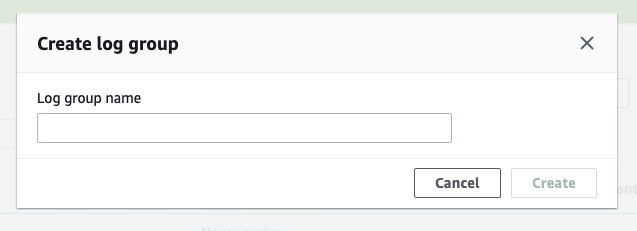
    When you create a Log Group through the AWS Console, it just prompts you to provide a “Name”. “Retention Policy” is not asked as an input.

    Creating a Log Group through the AWS Management Console

    One needs to “Edit” the log group through the “Actions” menu to change the “Retention Policy” from the default “Forever” to something reasonable.

    Setting the Retention Policy for a Log Group

    In fact, the behavior of the APIs are also similar. Here’s the create-log-group CLI command:

      create-log-group
    --log-group-name <value>
    [--kms-key-id <value>]
    [--tags <value>]
    [--cli-input-json | --cli-input-yaml]
    [--generate-cli-skeleton <value>]
    [--cli-auto-prompt <value>]

    And one needs to use an additional put-retention-policy CLI command to change the retention policy:

      put-retention-policy
    --log-group-name <value>
    --retention-in-days <value>
    [--cli-input-json | --cli-input-yaml]
    [--generate-cli-skeleton <value>]
    [--cli-auto-prompt <value>]

    And for services such as EKS (which manages the Kubernets control plane), the only way to get the control plane logs is through CloudWatch Logs. If you look at the console, these are just simple checkboxes.

    Configuring EKS Control Plane logs that gets sent to CloudWatch Logs

    It’s pretty simple from usability perspective, but in this case, it’s the EKS service which abstracts the creation of the underlying Log Groups and the customer doesn’t really have the option to specify a retention policy.

    On a busy EKS cluster, these logs can quickly grow and CloudWatch Logs can easily become one of the major line items of the AWS bill.

    My Recommendations

    Configure retention policies

    Do NOT go with the default retention policies which retain the logs forever. A service like CloudWatch Logs is meant to be used as a Hot tier for logs. In Hot tier, logs are readily available for querying and dashboards. Most organizations need to have logs in “Hot” tier only for few weeks if not couple of months.

    So, make sure you are configuring a reasonable “Retention Policy” for your Log Groups.

    Archive to S3

    Once you no longer need logs in Hot tier, you can move those logs to a Warm tier. In a Warm tier, logs are not readily avialable for querying but they can still be “accessed” readily (as files). One can download specific files of interest and query locally or even push such files on-demand to a query engine like ElasticSearch.

    CloudWatch Logs provides an option to “Export Log Data to S3”. You can use this feature to periodically (using a “from” and “to” timestamp) export logs to S3. Please refer to this documentation for more details. Of course, you can automate this through the create-export-task API.

    Of course, you do want to have a Lifecycle Policy created on those S3 buckets so that those Archived logs don’t live in S3 forever

    Cost Allocation Tags for Log Groups

    When CloudWatch Logs costs become a concern, one of the areas that organizations struggle is first identifying the source/owner of such high costs Log Groups. More often, the person who is doing the cost optimization exercise is not the same as the person who creates/manages infrastructure.

    The standard and easiest way to address this is to use “Tagging”. Specific tags can be used as Cost Allocation Tags so that those tags appear in AWS bills and can be used to identify and allocate costs.

    The good news is that CloudWatch Log Groups also support tagging. If your organization has a tagging strategy identified, you can use the same to tag Log Groups as well. This helps in identiying teams/owners when CloudWatch Logs costs become an area of concern.

    The not-so-good news is that this Tagging feature is not available as part of the CloudWatch Management Console. However, its available as part of the APIs. Here’s the CLI command that can be used to tag a Log Group

      tag-log-group
    --log-group-name <value>
    --tags <value>
    [--cli-input-json | --cli-input-yaml]
    [--generate-cli-skeleton <value>]
    [--cli-auto-prompt <value>]

    Create Log Groups through Infrastructure As Code

    Needless to say, it’s best to create Log Groups through some Infrastructure As Code (IAC) utility such as AWS CloudFormation or Terraform. Doing so, you can take care of retention policies and tagging automatically.

    What’s interesting is though, the difference between these two popular methods of IAC:

    Appropriate Log Levels

    Of course this goes without saying: making sure code/application is logging at desired levels. You may not see the effect of too much verbose logging when you are logging to a file.

    However, if the same code is deployed as a Lambda function, you will see a direct impact in CloudWatch Logs cost. Every line that is streamed to CloudWatch Logs is going to be factored as part of the $0.5 per GB Ingestion cost.

    AWS can do a bit more

    I think AWS can do a bit more to help customers here.

    • Prompt for retention period during Log Group creation. Basically merge the create-log-group and put-retention-policy APIs. At the time of creation of the Log Group itself, the Console and the APIs should take the “Retention Policy” as an input
    • Services where CloudWatch Logs is deeply integrated (such as EKS control plane logs, Lambda, API Gateway), provide the “Retention Policy” settings as part of the configuration
    • Just like Vended Logs pricing, provide a tiered pricing for Data Ingestion. Or provide a commited discount (similar to RI) for Data Ingestion. Most applications can commit to certain volume of steady state logging and can benefit from discounts

    Lastly, I have seen enough customers worrying about CloudWatch Logs in general. So much that even a reasonably large company like Basecamp worries about the service. I think AWS should really work towards addressing customers’ concerns with this service.


    Logs are an important part of any application. While as developers and architects we love as much visbility through logs, it’s equally important to consider the trade offs with the actual cost of such visbility. Thinking ahead about the above aspects of CloudWatch Logs will go a long way in keeping costs of log aggregation under control.

    Hope this article helped in understanding how to keep CloudWatch Logs costs under control. If you do use other techniques, please do share those in the comments section below – would love to hear those!!

  • Privacy | Final Thoughts

    Privacy | Final Thoughts

    If you have been following through the posts in this series, I hope you had few take aways and found this series helpful. As a recap, here are the posts in this series:

    Baby Steps

    I have been in this journey for close to an year now. And it looks like this is going to be a pretty long journey. While I have taken some steps to get back in control, I also realize that these Big Tech companies will continue to track me in various other ways.

    However, I have seen visible changes in how much I am being followed. It has certainly reduced drastically. But I have become a bit more paranoid :). I have turned of location access to lot of apps on my mobile. Have uninstalled quite a lot of apps. Have turned off notifications. I come across as a strange/weird person amongst my family and friends when I tell them I don’t have/use certain products.

    The Cost of Privacy

    One of the other things that I realized is the cost of getting privacy in one’s life. Well, I am not talking about the how much our data is worth. I am talking about how much of an effort and cost it takes to get even a small amount of Privacy and control.

    As I reflect back in my life, I hadn’t thought about Privacy over these last 15 years of my active digital life. And I realize now, one can think about Privacy only after certain basic needs and comforts of your life have been take care. Especially in countries like India where vast majority of the population are still deprived of those. You cannot have a conversation with them about paying for email!!!

    And that’s where platforms like Android and companies like Google/Facebook/Whatsapp have made vast improvements in an average person’s life. So, while these Big Tech companies do benefit extensively by their “large scale tracking” to monetize user’s data, it is the same companies that have made differences in those people’s lives as well.

    Educating Privacy

    However, I think it is important that we need to educate as many people as possible about Privacy. They should be aware about the trade offs that they are making – what they are letting go and if they are OK with it.

    A lot of people are completely unaware of how their behaviors are being manipulated by these platforms by harnessing their data. I see it right in my living room where my Parents are manipulated by certain ideologies and they always see only one side of the story.

    What I find even more difficult to cope up with is the fact that a lot of my friends and colleagues in the tech industry are completely blind to these. These are folks who can afford a pretty good Urban “Upper Middle Class Lifestyle” and work as Architects/Programmers/Leaders in large tech companies (including large Unicorns).

    Few More Resources

    • PrivacyTools.io – a great collection of tools, services, products that are privacy focussed
    • Power of Habit – an awesome read on how our brains can be tweaked to form Habits. You will be able to relate how large companies can apply these techniques to nurture habits in their apps
    • Hooked – A similar book on how to build habit forming products. Again you will be able to relate how corporations build techniques to keep user’s addicted to their products
    • The Brain by David Eagleman – a great book to understand of our brain. How’s this relevant to privacy? You will understand how our brain works and how it can be easily manipulated

    Couple of Requests

    • If you found this series interesting, please do share with your friends and colleagues who could benefit from these perspectives and can take some action to get back some privacy of their lives
    • If you have found other tools and techniques around Privacy, I would be very keen to learn those. Please do share those in the comments – lets keep the conversation going

    If you have really come this far and read through all the posts in this series – a huge Thank You. Hopefully you found it worthwhile!!


    Surveillance by the State

    While I largely focussed this series on Surveillance by private corporations, what about large scale Surveillance by governments across the world?

    The focus of this series was never about Surveillance by governments. That in itself is a huge and controversial topic. However, as I conclude this series amidst Covid-19, I feel in a post pandemic world, it might be necessary for a citizen to be tracked by the government if she wants to participate in the economy.

    For example, only if your status is “Green” in the mobile app provided by the government, you will be allowed to, say, have dinner in a restaurant. I will leave that thought with you 🙂

  • Privacy | De-Google | Other Products

    Privacy | De-Google | Other Products

    After I moved out of Google Search and GMail, it was time to take stock rest of the Google ecosystem and take steps to move out of those as well.

    Google Chrome

    This was a pretty straight forward decision. And in fact, I moved out of Chrome right in the early days. If you remain pretty much in the Apple ecosystem, then Safari is a natural choice. It has got pretty good privacy focussed defaults now and I don’t have to talk about the deep integration with the Apple ecosystem.

    Firefox

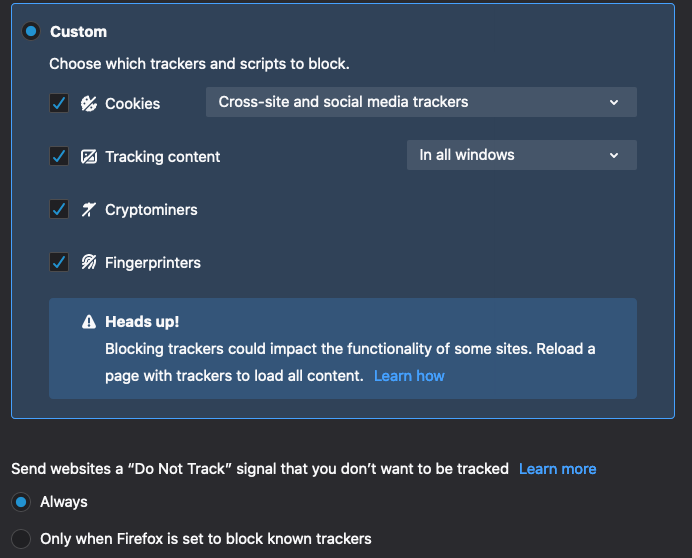
    However, I now use Firefox as my primary browser. Firefox has also become extremely privacy focussed in the last 18 months or so. Firefox now comes with “Enhanced Tracking Protection” that automatically blocks cross-site and social media trackers. Here’s what it can block automatically

    Firefox Containers

    In addition, I use an extension called Firefox Containers. This allows you to create multiple isolated containers within Firefox. I use this for two purposes:

    • What it was originally intended for – if you use the same product for multiple use cases then you can run both in the same browser. For example, if you have got multiple email addresses with a service provider, you can be “always logged in” both of them. No more switching across multiple browsers
    • Dedicated container for Google – for all those occasional Google searches that I still do, it all goes into a separate container
    • Dedicated containers for tracking sites – any sites that are very likely to track extensively, I make sure they run on a separate dedicated container

    Brave

    I also hear rave reviews about this new privacy focussed browser called Brave (based on Chromium). I haven’t given it a shot yet – something that you might want to evaluate.

    Google Photos

    I completely migrated all of my Google Photos to iCloud. I was definitely worried about giving information about my family, how it is evolving (kids growing up, their gender and all). Given the amount of pictures that we take with or phones these days, the simple question was this – why would a service provider give unlimited storage for photos. And if you are comfortable keeping pictures of some of your private moments with such a service provider. I was not.

    I switched to iCloud Photos, given, again, Apple’s focus on Privacy. And the fact that they do charge for storage beyond the initial 5GB that everyone gets.

    If you are not on the Apple ecosystem, I would recommend you to choose a third party / neutral service provider like Flickr.

    Google Drive / Cloud Storage

    Apart from Photos, I was using Google Drive to store documents and backup. I have moved those to iCloud Drive as well. However, I did consider the following alternatives and went with iCloud Drive as it was simpler (one vendor for all data backups).

    • Dropbox – I was annoyed with the fact that they either have a paltry 2 GB for free users and start with 2TB for their paid plans. I don’t need 2TB of storage. I feel most people would be just ok with 100GB of cloud storage. Even though storage prices have continuously fallen, it felt Dropbox was more interested in keeping prices high and satisfying their shareholders rather than providing options to consumers
    • Sync.com – A cloud storage provider with end to end encryption
    • IDrive
    • pCloud

    Google Pay

    This is one of the hottest products now. Almost everyone has Google Pay on their phones and use it for making both online and offline payments in India. I hear great reviews from my friends and colleagues in terms of how seamless it is and the great user experience.

    I didn’t bother to sign up for this from day one. To me, Google Pay is Google’s shot at getting shopping data – both online and offline. Something that is increasing becoming locked within the walls of Amazon (people no longer search in Google and buy in Amazon. They search in Amazon and buy in Amazon).

    I cannot fathom the amount of data that they would be able to collect from all those transactions that go through their network. And I would highly recommend you to think if that extra convenience is worth!!

    Note: For what it’s worth, I have stopped using PayTM and Amazon Pay as well for the same reasons.

    Final Thoughts on Google

    With that, I am mostly out of Google products. I still use YouTube though – no viable alternatives!!!

    While, I have gotten rid of all the above Google products, I do realize that Google will continue to track. I guess more than 90% of websites that I regularly visit will have some kind of Google trackers. However, I feel comfortable that I at least make it harder for them.

    Google was and is a company that I admire for the “technology” part. No one has pushed web and mobile as they have. No one else operates at their scale. However, I never thought that the very company that I admire also has sacred me enough.

    Alongside all these free products, if they provide a “paid” option where data is not monetized, I would happily come back to this ecosystem. Until then, I will continue to De-Google my life.


    So, how is life after all the steps? What lies ahead? Here’s the last post in the series on some of my closing thoughts on Privacy.

  • Privacy | De-Google | Gmail

    Privacy | De-Google | Gmail

    After I moved away from two major Google services, the next beast in the house was Gmail. And this one wasn’t easy too.

    Here’s a bit of backstory of my experience with email and how it still remains intimate. If you aren’t interested, you can skip this completely and continue from here.


    The year was 1999. I had just finished my high school in India. Me and bunch of our school friends went in different directions to pursue our college education. And we wrote letters to each other. You know, those letters where you literally had to write them on a piece of paper.

    We used to run out of paper that we would write in the margins with arrows pointing continuity (those habits from school where you always left margins on all sides whenever you wrote anything :)). And then the letter used to take few days to reach the other side of the country. And what a joy it was to open such letters – so much that I still have some of those with me after 20 years!!

    These were pre internet days in India. Or rather, pre computer revolution days – not a lot of homes could afford computers. Within the next couple of years the internet landscape in India started changing. We used to go to what’s called as “internet cafes” where you can rent a computer with an internet connection.

    And that’s where we discovered things like Hotmail and Yahoo Mail. And what a revolution it was. That we could communicate with someone 1000s of miles away so easily! Yahoo offered something like 2MB mailbox size and Hotmail bumped it to 5 or 10MB. And it was such a celebration. That we could keep more memories in our Inboxes (we still used to clean up some old ones though).

    And then it was circa 2005 or so. We heard about something called as Gmail that offered a whopping 1GB of space. Google was still a search company. We were fascinated with the idea that someone could offer us 1GB of space for free!! There was a mad rush to get the invites. And every time you went to Gmail’s home page, the counter that showed how much Inbox space is offered kept increasing slowly!!

    Wow, what a moment in history for email it was. That I longer have to delete a single email anymore and I could keep all my communication with my friends and colleagues for ever! And how clean the interface was!! With all those labelling, filtering, searching – Email had indeed arrived with Gmail.


    The nail in the coffin

    15 years later. The very company that revolutionised email, has scared me enough that I am taking every step to cut my relationship with them.

    While Google had clarified earlier, that they will no longer scan customer’s emails for serving ads, in May 2019, there was one incident that finally made me take the step of leaving Gmail. There were numerous aritcles, like this, that spoke about Gmail tracking user’s shopping activitiy. When I checked my account history, all my shopping activities across e-commerce stores, those food and grocery deliveries to my home – everything was neatly organized.

    Since then, Google seems to have removed this feature. But it was good enough for me to make a decision. By now, I had already moved out of Android and Google Search. GMail was just a matter of time anyways.

    The Alternatives

    This one is harder – isn’t it? When it comes to email, there are plenty of providers. Almost every hosting company or your ISP itself provides an email service. And you do have a host of other free email service providers:

    • Going back to Yahoo / Outlook – A big NO as they have a huge advertising engine
    • Mail.com – free email service from Germany but displays Ads based on email context
    • GMX – another email service provider from Germany

    While looking for alternatives, almost every article that was listing out options, mentioned few service providers who provide “Paid” email service. And then it stuck me.

    Back in the days, when we used to write letters to our loved ones, we bought those blank letters from the post office. Or we affixed a Stamp on them. Those letters were sealed. That meant, the service provider, the postal service in this case, has no reason to look at what’s written inside the letter. And the person on the other side would know the post office had looked at the content if the “seal” is broken.

    If email is a communication service, isn’t that how emails are also supposed to be? That the service provider shouldn’t have any business in looking at the content of the emails (except for things like spam filtering)?

    That led to me find a host of email service providers who take pride in providing email as a service at a price. No snopping into email contents. No Ads. No Tracking. Here are the top ones that I found:

    Out of the above list, ProtonMail and Tutanota provide end to end encrypted email service. Fastmail and Zoho Mail do not seem to encrypt email content but their business models are based on customers paying for their service.

    ProtonMail

    Out of all the above paid email service providers, most people overwhelmingly recommended ProtonMail.

    I switched to ProtonMail about an year ago. An end to end encrypted email service. ProtonMail and its staff cannot snoop into your email. Data is encrypted on the client side using an encryption key derived from your password.

    Pros

    • A business model which clearly establishes that they are not interested in tracking user’s emails
    • On the server side they don’t log any data that is traceable to the user. You can checkout their security/privacy capabilities here
    • Open source: They recently open sourced their code so that anyone can validate their claims. This is a big deal!!
    • Based out of Switzerland where privacy laws are pretty strict
    • Most of the typical email features that you expect like filters, labels work well
    • Mobile apps
    • Tons of features like custom domain, aliases, catch-all and so on

    Cons

    • Limited search capabilities. Because the email body and attachments are encrypted, the search doesn’t work on them. Search is limited to Subject and From/To addresses. This can be a bit frustrating coming from GMail
    • If you come from the Google ecosystem where calendar, contacts, drive, docs and others are pretty deeply integrated, you will miss those. They just recently got “Encrypted Calendar” out and are working on ProtonDrive – a Google Drive’s equivalent. So pretty much early days

    Paying for the service

    Apart from all the “Cons” listed above, I expect one major block for most average users. It’s the notion of “paying” for email. Over the last 15 years, we have got so used to things being “free” and most people (including me) didn’t understand the extent of tracking by large corporations like Google.

    While ProtonMail offers a “Free Trial”, the capabilities are fairly limited. You need to switch to one of their paid plans for the service to reasonably work for your day to day email needs.

    My other worries

    While I have been a paid user for the last year or so, I still do have some worries on using the service.

    • Service getting blocked: There have been incidents where ProtonMail has been blocked by countries (this, this). So, there is this worry in the back of my mind if the service could be blocked by the country where I live and I will lose access to my emails. Proton also provides a VPN service that can be used to address this issue
    • Accounts getting blocked: There have been instances where people have reported (here, here) that their email acocunts have been locked by ProtonMail’s automated systems. Most of them have been able to work with ProtonMail’s support and get it unlocked
    • Service Availability: One other major worry is the long term availability of the service. Compared to a big tech firm, ProtonMail is still a small, privately held firm. Though their business model is based out of paid services, we have no clue about their profitability and long term sustainability

    My Recommendation

    Despite the above worries and few cons, ProtonMail has been working very smoothly for me for the last year. Here’s what I would recommend:

    • Start with their free trail and check out their experience
    • If you decided to use it for “prime time”, then I recommend switching to a paid plan
    • They provide a short domain called “pm.me” as an alternative to “protonmail.com” (which is longer). The free plan allows people to send emails to both @protonmail.com and @pm.me. However, for sending emails using @pm.me, you need to be on one of the paid plans
    • I will also recommend you getting a domain and use it for emails (PM supports custom domains in their paid plans). Having a custom domain will help in future if you have to switch out of PM into some other email service provider (you don’t have to change email addresses at all those websites you are signed up)

    Closing Thoughts

    While I have started using ProtonMail as my primary email service, I am still not completely out of GMail. Primarily because service providers like banks, mutual fund houses make it hard to change email addresses – you got to physically visit them to make changes.

    Having said that, I feel it is a right step. It may take another year to come out of GMail completely. However, with every email that I am able to switch out of GMail I feel more comfortable with the fact that I am reducing or at least making it hard for Google.

    And if you are planning to go down this road, I would suggest you to take it slow as well. It is definitely worth it.


    With Android, Search and Gmail out of the gate, it’s time to look at the other products. That’s for an another post.

  • Privacy | De-Google

    Privacy | De-Google

    In the last post, I had explained about getting out of Facebook and the steps that one can take to limit their tracking across the web. Getting out of Facebook was fairly easy for me as I had far more reasons beyond just data privacy.

    However, “De-Google-ing” my life was far more harder.

    The biggest realization for me after that spooky incident was this: Google had changed from “organizing world’s information” and “Don’t be evil” to the biggest Advertising engine of the world who’s sole purpose is to track people, gather data about them and monetize that by selling Ads that can be targetted to those very individuals.

    When I looked around, there were so many areas where I was using Google’s services and getting out of all those services wasn’t easy. Its been 3 years since that event and I am still not out of Google completely in my life. There are still bits and pieces of Google that I am still not able to come out of. At least not entirely.

    Here are some of the things that I have been able to achieve and these have certainly made differences with respect to how less I am being followed by Google these days.

    Android to iOS

    Coming from a country like India where affordability and value for money are the biggest drivers of most purchasing decisions, I was no exception. For many years I was on the Android ecosystem.

    I was (and still) a strong believer in open source and for a while I was completely against Apple’s closed ecosystem. I have argued many times with friends and colleagues about how a closed ecosystem like Apple’s leads to lesser innovation and monopoly.

    But after that incident that spooked me, the first that I did was switching to Apple. Being on Android and using Google’s services, I was literally providing vast amounts of data about myself to power the Ad Engine that Google had become.

    The Apple ecosystem is definitely much more expensive (and less innovative – they are still talking about home screen widgets in iOS 14 while Android had it from the time of dinosaurs) than the Android ecosystem. For literally half the cost of an iPhone, you get top of the spec Android phones. iPhones are still pretty much out of the reach for most of the people in India.

    However, I now trust Apple more than Google. Primarily because, their profit margins are still on the devices and not driven by data. I feel that Google is discounting all their costs towards Android because they are able monetize through the data collected from its users. As they say, “if there is something free (or cheap) then you are the product”.

    Over the last couple of years, Apple has really been focussing on Privacy. For example, pop ups that prompt whenever apps are using location services and showing a map of how the app is tracking your location are steps in the right direction.

    I still don’t own a top of the line iPhone 11 Pro. I own a modest iPhone SE. That’s what I can afford now – or rather I don’t like to splurge Rs.100,000 on a phone. When I take my phone out I may appear as someone who has come out of the caves. But I can be rest assured that I am in an ecosystem that I can trust.

    Google Search to DuckDuckGo

    The next step was to move out of Google as the search engine. I switched to DuckDuckGo and it has been my default search engine for more than a year now.

    Google obviously revolutionized the “Search Engine” industry. But today, it is no longer a “Search Engine”. It has transformed itself into an “Ad Engine”.

    Here are some examples:

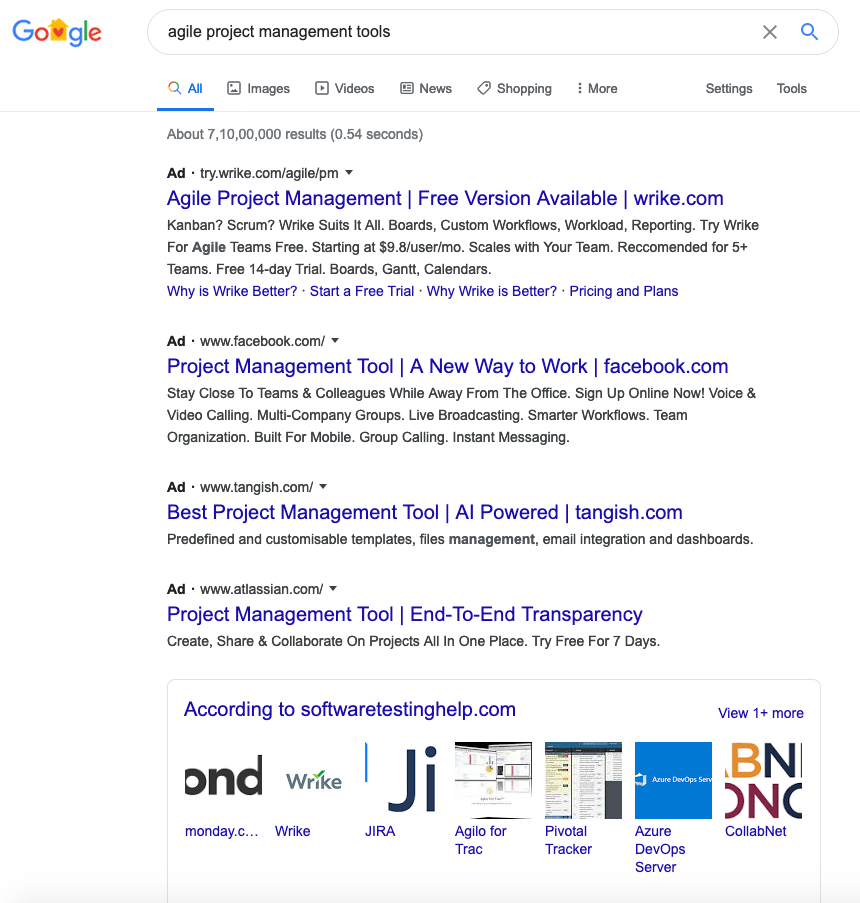
    I searched for “Agile Project Management Tools” and the top results are “Ads” – only if I scroll down further I see some organic search results.

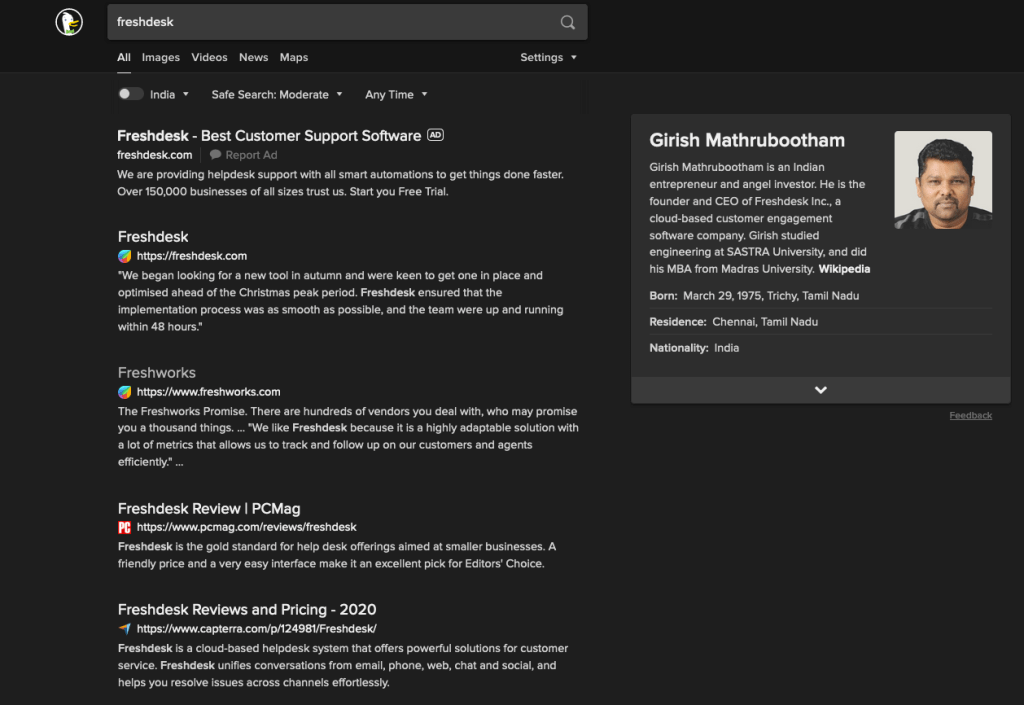
    While I could accept to an extent about the above behavior, here’s what is even more shocking. I searched for a specific term “freshdesk” – a helpdesk product from a company called “Freshworks” and here are the results from Google and DuckDuckGo. I am not going to explain the differences between the results – it’s kinda self explanatory. Freshdesk is basically paying Ad money to Google to come on top of search results where the user organically searched for the term “freshdesk” and not a generic term like “helpdesk software”

    A brilliant Ad campaign by Basecamp

    Basecamp went through the same experience of paying $$$ to Google’s Ad engine to stay relevant in organic search results. And they did something about it. They ran a pretty intelligent Ad campaign and it seem to have had an effect. You can read the following twitter thread for more details:

    So why do I care?

    After all the above problems are for businesses right? So as an end user why should I care? The problem is that we have come to trust the “Search Engine” as the gateway to the internet. However, an Ad Engine like Google (I no longer treat them as a Search Engine) is manipulating the search results and thereby the user’s behaviour (in terms of our buying decisions). And all these are done for sheer profits in the disguise of convenience for the users by offering them free tools that continuously track them.

    So how’s DuckDuckGo working out?

    For more than one year, DuckDuckGo has been my search engine across all my devices. And I have been pretty much OK so far. One area where Google still shines is “Local Information”. If I am looking for something specific within my locality, Google still does a much better job than DDG. However, for any of your typical web searches DDG has been fine. I am still able to find product reviews, stackoverflow answers, technical articles, blogs, news, image searches and so on.

    I highly recommend switching to DDG and using Google search sparingly. Use Google only if you are not able to find what you are looking for in DDG. Google doesn’t have to be your default search engine!!


    Well, the journey has just begun. I have just got out of two tools from Google. However, these are pretty big behavioural changes for anyone – it was for me. Moving from Android to iOS? One needs to completely unlearn years of muscle memory and get used to something new. It’s a big step definitely. But definitely worth it I would say.

    If that sounded like too much to you, let’s talk about another beast in the house in the next post.

  • Privacy | Getting rid of Facebook

    Privacy | Getting rid of Facebook

    Facebook was the first thing that I got rid off. To be honest, I had begun my journey of getting out of Facebook much earlier. For different reasons though.

    To me, Facebook became a source of negativity. Whenever I logged into Facebook, my news feed was filled only with positive sides of people – their vacation pics, their weekends, their selfies, checkins at restaurants and so on.

    Soon, I started feeling as if everyone else apart from me were having a better life. And I started questioning myself with some of the choices that I made in my life. (The realization came after I quit facebook – that, in these social networks, people only want to display their positive sides. While in the real world, life happens!!)

    Anyways, at some point, Facebook became a major source of stress in my life that I decided to something about it – cut down the time that I spend on Facebook. I was using Chrome as a browser (not anymore) back then and I installed an extension called StayFocusd (if you are using Firefox, you can try LeechBlock) through which you can limit the amount of time you spend on a website.

    This was back in 2014 where Facebook mobile apps haven’t really taken off. So, if you are going to do this today, you may want to find similar tools for mobile apps.

    So, I set some pretty aggressive targets like “10 minutes in a day” when I started. And the result?

    I was over riding the settings very often to extend it by few more minutes 🙂 I guess that’s how it works with every addiction. But soon, I was well under that 10 minutes target. And eventually I stopped visiting Facebook. The constant interruption by the extension and the extra work that I had to do to extend the “timer” started having effects on my addiction. Eventually brain seems to have given up.

    A few months later, I first de-activated my FB account and eventually deleted the account. I wasn’t able to hit the “Delete” button for few days – the fear of letting go kept me from doing that. But eventually I hit that button.

    Its been close to 5 years now since I hit that “Delete” button and I would say that I am not missing anything.

    Those blue Like and Share buttons that used to follow me everywhere – they have disappeared completely.

    More importantly, in the wake of the Cambridge Analytica scandal (if you haven’t seen, I highly recommend you to watch the documentary “The Great Hack“), I was relieved that I got rid of Facebook much earlier.

    I could really see Facebook’s impact in dividing our society at large. We are more divided today as we create our own “networks” and those networks’ intelligence (gained through continous tracking of us) constantly feed stories that satisfies our “confirmation biases”. We no longer spend time to learn about other sides to a story to make our opinions.

    Facebook tracks even without an Account

    While getting rid of Facebook relieved me of the negativity, what I realized later was that Facebook continues to track even if I didn’t have an account with them. If any of the websites that I visit have integrated with Facebook (for advertising, Like/Share buttons, Pixel Tracking), then all those websites feed data back to Facebook irrespective of me having an FB account or not.

    So what are your options?

    • Tweak your Browser’s settings to block “Cross Site and Social Media Trackers”
    • Configure your Browser to send a “Do Not Track” signal. Websites are “supposed” to honor this setting but its entirely upto them. Neverthless its good to have this turned on by default
    • Install “Privacy Badger” which will learn if “Do Not Track” is not being honored by websties and starts automatically blocking those trackers
    • Install “Facebook Container” if you want to continue to use Facebook but limit their tracking. This will isolate all your Facebook activity into a separate container so that Facebook doesn’t track you across other websites that you may visit
    • You should really ask yourself if you need that Facebook app on your phone

    While I took some of these steps, I am pretty confident that Facebook will continue to find ways to track me – after all they employ thousands of best technical minds in the world!! But, by large I am kind of at peace with respect to Facebook. I don’t miss it at all. I don’t feel that I am not connected to people. In fact I feel better connected with people that matter to me – in the real world.

    May be there are still some invisible trackers that continue to send data to Facebook. However, I feel I am not being followed as it used to be earlier. May be its because of few other things that I have done as well – which I will share in the next set of posts.

    If you do use Facebook extensively, you must evaluate some of your choices. At least understand what data might be gathered about you and if you are OK with it. For example, if you have Facebook installed in your mobile device, you should be aware that at a minimum the following is being collected by Facebook:

    • A lot of wealthier data about your device – OS, times of the day you are active, deviceId, Contacts Identifiers, SMS, Call logs, Wi-Fi connections
    • Location data including which stores you visit offline
    • What all apps you have installed in your device
    • What all apps your FB friends have installed on their devices
    • Tying all those data points with other Facebook owned apps – Whatsapp (metadata as data is end-to-end encrypted in Whatsapp), Instagram

    All these are data points on top of data that you voluntarily give to Facebook – your profile information, pictures, posts, status updates, etc, etc.


    The next step was to look at a much larger beast in our lives!!!

  • Privacy | My experience so far in getting back control

    Privacy | My experience so far in getting back control

    The year was 2016. I was at at AWS re:Invent – the world’s largest Cloud conference. I met one of my ex colleagues in the hallway. I vividly remember the time to be around 5 in the evening (I am pretty sure about the time because the hallway gets extremely crowded during the mornings and evenings when 1000s of people are making their way in/out of the conference centre).

    We had a small chat and I was back at my room after my dinner. And then I start getting notifications on my phone saying the “My ex-colleague’s company is in the news!!!”. I dismiss the notifications and try to get some sleep.

    The next day, at the same conference, I was seated for a keynote and one of my colleage brings along a partner (with whom we closely work for business). We have our usual introductions and small talk and spend the next 2 hours listening to the keynote. Around lunch time, I get a similar notificaiton on my phone – that the partner’s company is in the news!!

    To be honest, those incidents freaked me out. We also had many random discussions at work about how some of these big tech companies were mining data (I remember discussions about Facebook tapping into device’s microphone). I had a Google Nexus phone back then and I was thinking if Google was tapping into the micrphone as well.

    But being in technology, one understands how expensive it is to perform speech to text (even at Google’s scale) for displaying Ads. Soon, I realized the power of location data. Combine that with 1000s of other data points collected through browsers, devices, apps. These algorithms employed by Google and Facebook have become pretty sophisticated. So, powerful that they were able to send targetted advertisements within hours of me meeting someone!!!

    Those two incidents were beginning of a long journey (that’s still far from over) of me trying to get some control over my data and privacy. The journey is a mixed bag and definitely with some serious tradeoffs with convenience.

    In the following series of posts, I plan on writing about my experience so far. The choices that I have made. The deliberations that I had to make before making those choices. And my views now after using those choices for a while. I am hoping that it would help someone else make such choices informed.

    The first step was about getting facebook out of my life!!

  • AWS re:Invent | Beyond The Shiny New Toys | Containers

    AWS re:Invent | Beyond The Shiny New Toys | Containers

    This is part of the Beyond The Shiny New Toys series where I write about AWS reInvent 2019 announcements

    AWS ecosystem around containers is pretty large. It comprises of AWS’ own orchestration engine, managed Kubernetes control planes, serverless container platforms, ability to run large scale batch workloads on containers. And a whole lot of deep integrations with rest of the AWS ecosystem for storage, logging, monitoring, security to name a few.

    AWS re:Invent 2019 saw quite a few announcements around containers. These announcements further simplify deploying and managing container workloads. Here are some of them that I liked.

    AWS Fargate for Amazon EKS

    https://aws.amazon.com/blogs/aws/amazon-eks-on-aws-fargate-now-generally-available/

    When EKS was launched last year, we saw this coming eventually. And here it is. You can now launch Kubernetes Pods on AWS Fargate with absolutely no infrastructure to manage.

    With Amazon EKS, AWS offered a managed Kubernetes control plane. This definitely solved a major pain point of dealing with all the moving parts (etcd!) of the Kubernetes control plane. However, customers still had to manage the worker nodes (where containers actually run) of the cluster – such as scaling them, patching them or keeping them secure.

    AWS Fargate is a fully managed, serverless offering from AWS to run containers at scale. AWS completely manages the underlying infrastructure for your containers (like AWS Lambda). Similar to Lambda, you only pay based on the memory, CPU used by your containers and how long the container ran.

    Fargate Profile

    One of the aspects that I liked about this launch is “Fargate Profile”. With a Fargate Profile, you can declare which Kubernetes pods you would like to be run on Fargate and which ones on your “own” EC2 based worker nodes. You can selectively schedule pods through Kubernetes “Namespace” and “Labels”.

    This means, with a single Kubernetes control plane (managed by EKS), an administrator can selectively schedule Kubernetes pods between Fargate and “EC2” based worker nodes. For example, you could have your “test/dev” workloads running on Fargate and “prod” workloads (where you may need more control for security/compliance) running on EC2 based worker nodes.

    Here’s an example Fargate Profile:

    {
        "fargateProfileName": "fargate-profile-dev",
        "clusterName": "eks-fargate-test",
        "podExecutionRoleArn": "arn:aws:iam::xxx:role/AmazonEKSFargatePodExecutionRole",
        "subnets": [
            "subnet-xxxxxxxxxxxxxxxx",
            "subnet-xxxxxxxxxxxxxxxx"
        ],
        "selectors": [
            {
                "namespace": "dev",
                "labels": {
                    "app": "myapp"
                }
            }
        ]
    }

    With the above fargate profile, pods in the namespace “dev” with labels “app”:”myapp” will automatically get scheduled on Fargate. Rest of the pods will get scheduled on EC2 worker nodes.

    All without any changes from the developer perspective – they deal only with Kubernetes objects without polluting those definitions with any Fargate specific configurations. Kudos to the AWS container services team for coming with such a clean design.

    Note: AWS ECS also works on a similar model through Launch Types. However, ECS control plane is AWS propreitary and they would have all the freedom to offer something like this. Offering something similar to Kubernetes is truly commendable

    AWS Fargate Spot

    https://aws.amazon.com/blogs/aws/aws-fargate-spot-now-generally-available/

    I guess it’s self explanatory. You get “Spot Instances” type capabilities in Fargate now. With “Termination Notification” to your Tasks. This translates to significant cost savings for workloads that can sustain interruption. You can read more about it in the above blog. However, I have mentioned it here as it serves as a pre-cursor for the next couple of new features that we are going to look at.

    Amazon ECS Capacity Providers

    https://aws.amazon.com/about-aws/whats-new/2019/12/amazon-ecs-capacity-providers-now-available/

    Capacity Providers, as the name suggests deal with providing compute capacity for the containers running on ECS. Previously, for ECS clusters on EC2, customers typically deploy an AutoScalingGroup to manage (and scale) the underlying EC2 Capacity or use Fargate (you control through Launch Types). 

    With Capacity Providers, customers now have the ability to attach different Capacity Providers for both ECS on EC2 and ECS on Fargate. A single ECS Cluster can have multiple Capacity Providers attached to it. We can also create weights across Capacity Providers (through Capacity Provider Strategy) to distribute ECS Tasks between different Capacity Providers (such as On-demand and Spot Instances).

    That sounds a bit complicated? Why is AWS even offering this? What use cases does it solve? Let’s look at a few:

    Distribution between On-demand Spot Instances

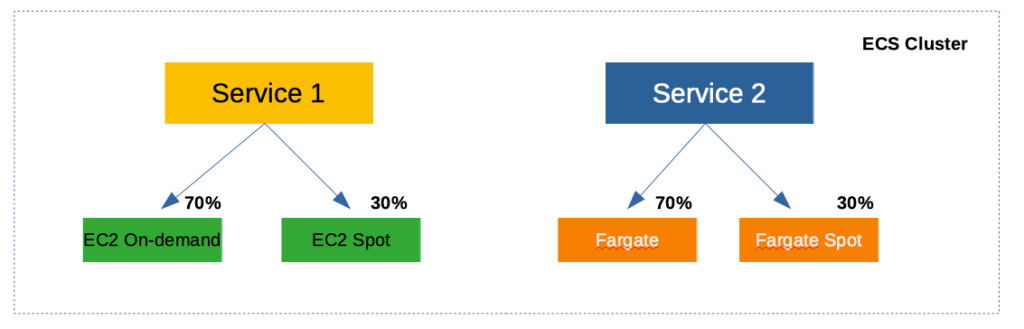
    Let’s say you want to mix On-demand and Spot Instances in your cluster to maintain availability and derive cost savings. Your ECS Cluster can have two Capacity Providers – one comprising of an AutoScalingGroup1 with On-demand Instances and another comprising of an AutoScalingGroup2 with Spot Instances. You can then assign different weights between these Capacity Providers controlling how much percentage Spot Instances you are willing to utilize. In the below example, you have 30% Spot and 70% On-demand Instances by assigning weights 1 and 2 to respective Capacity Providers.

    A single ECS cluster having a mix of on-demand and spot capacity through Capacity Providers

    Fargate and Fargate Spot

    Just like EC2, Fargate also becomes a Capacity Provider for your cluster. Which means, you can extend the above concept to control how much Fargate Spot you would want in your cluster.

    Better spread across Availability Zones

    Extending the “weights” that you can assign to Capacity Providers, you can now get better spread of “ECS Tasks and Services” across Availability Zones. For example, you could create 3 Capacity Providers (each having an AutoScalingGroup tied to a single Availability Zone) with equal weights and ECS would take care of evenly spreading your Tasks.

    This wasn’t possible earlier because ECS and the underlying AutoScalingGroup weren’t aware of each other. Earlier, you would create a single AutoScalingGroup that is spread across multiple Availability Zones making sure the EC2 Instances are spread across AZs. However, when ECS scheduler runs your “Tasks” it doesn’t necessarily spread the “Tasks” evenly across AZs.

    Even spreading of “Tasks” through CapacityProviders is now possible as ECS can now manage the underlying AutoScalingGroup as well through “Managed Cluster Auto Scaling” (a new feature described below).


    ECS Managed Cluster Auto Scaling

    https://aws.amazon.com/about-aws/whats-new/2019/12/amazon-ecs-cluster-auto-scaling-now-available/

    Prior to the launch of this feature, ECS did not have the capability to manage the underlying AutoScalingGroup. You created the ECS cluster separately and the AutoScalingGroup for the underlying Instances separately. The AutoScalingGroup scaled based on the metrics of “tasks” (such as CPU) that are “already running” on the cluster.

    So what’s the challenge with this type of scaling?

    When you create your “Service” in ECS, you can setup AutoScaling for the service. For example, you can setup a Target Tracking Scaling Policy, that tracks the metrics of your running “Tasks” (of the Service) and scale the number of “Tasks” based on those metrics. This works similar to AutoScaling of EC2 Instances.

    However, what about the scenario when your “Service” on ECS scales, but there is insufficient underlying capacity as the EC2 AutoScalingGroup hasn’t scaled EC2 Instances yet? You see the disconnect?

    With “ECS Managed Cluster Auto Scaling”, this missing gap is now addressed. When your “Service” on ECS scales, ECS will dynamically adjust the “scaling policies” of the underlying EC2 AutoScalingGroup as well. Once EC2 scales and capacity is available, the “Tasks” would be automatically scheduled on them.

    Note: This is pretty similar to ClusterAutoScaler in Kubernetes where it works alongside HorizontalPodAutoScaler. When there are more “Pods” that needs to be scheduled and there is no available underlying capacity, ClusterAutoScaler kicks in and scales the capacity. Pods will eventually gets scheduled automatically once capacity is available.


    Closing Thoughts

    On the ECS front, Capacity Providers and Managed Cluster Auto Scaling make it much more powerful and provides more control and flexibility. On the other hand, it does add a bit of complexity from a developer perspective. It still doesn’t come close enough to simply launching a container and getting an endpoint that is highly available and scales automatically.

    On the EKS front, Fargate for EKS is the right step towards offering a “serverless” Kubernetes service. I liked the fact that you can continue to use Kubernetes “primitives” such as Pod/Deployment and you can control using “Fargate Profile” to selectively schedule Pods to Fargate. This is a different direction from GCP’s Cloud Run which can simply take a Container Image and turn it into an endpoint.

    I am assuming AWS will continue to iterate in this space and address all the gaps. Looking at the plethora of options available, it appears that AWS wants to address different types of container use cases coming out of its vast customer base.

    ECS Vs Kubernetes

    And looking at the iterations and features on ECS, it looks like ECS continues to see customer adoption despite the gaining popularity of Kubernetes. AWS doesn’t iterate on services when it doesn’t see enough customer adoption. Remember SimpleDB? Simple Work Flow? Elastic Transcoder? Amazon Machine Learning?

    Whenever they don’t see enough traction, AWS is quick to pivot to newer services and rapidly iterate (they would still operate and support older services). The continued iterations on both ECS and EKS front suggests that there is currently a market for both the orchestration engines. Only time would tell if it would be otherwise.


    Well those are the announcements that I found interesting in the area of Containers. Did I miss anything? Let me know in the comments.