
This is part of the Beyond The Shiny New Toys series where I write about AWS reInvent 2019 announcements
Security in Architectures is an area I am passionate about. One of the most important things that I learnt during my tenure at Amazon is thinking about Security at the beginning of everything. You cannot build a great feature and then think about Security. You rather think about Security before even you start building out features.
Jeff Bezos always says “Customers are not going to wake up tomorrow morning and say they are willing to pay more”. Similarly, I would argue that “Customers are not going to tell you that they are OK to use a product/feature that is not secure by design”
Most folks call out On-demand provisioning, Elasticity, Cost efficiencies as benefits of Cloud. While those are definitely true, one of the most important aspect of Cloud is that it drastically changes the Security posture for everyone. A customer who pays $100 a month gets the same security baseline and features as an Enterprise who is running a highly regulated workload. And the baseline continuously improves.
Lets look at some of the important announcements made in the Security domain during re:Invent 2019.
Unused IAM Roles
IAM Roles have become such a fundamental building block for applications running on AWS. An IAM Role provides temporary access credentials to anyone assuming the Role. There are plenty of use cases for IAM Roles such as: applications running on EC2 Instances assuming a Role to get temporary creds, services such as Lambda/Kinesis talking to other services, users assuming roles to log in to AWS accounts (through SSO) and so on.
Pretty quickly your AWS account can get filled with plenty of such IAM Roles and you may start loosing track of which IAM Roles are actually being in use.
To know if you a particular IAM Role is being used or not, through Access Advisor, you can now check the latest timestamp when the Role creds were used to access an AWS API. Under IAM, go to Roles and choose any Role to open it’s Summary page. You will find a tab called “Access Advisor” where you can view when the Role was last used.
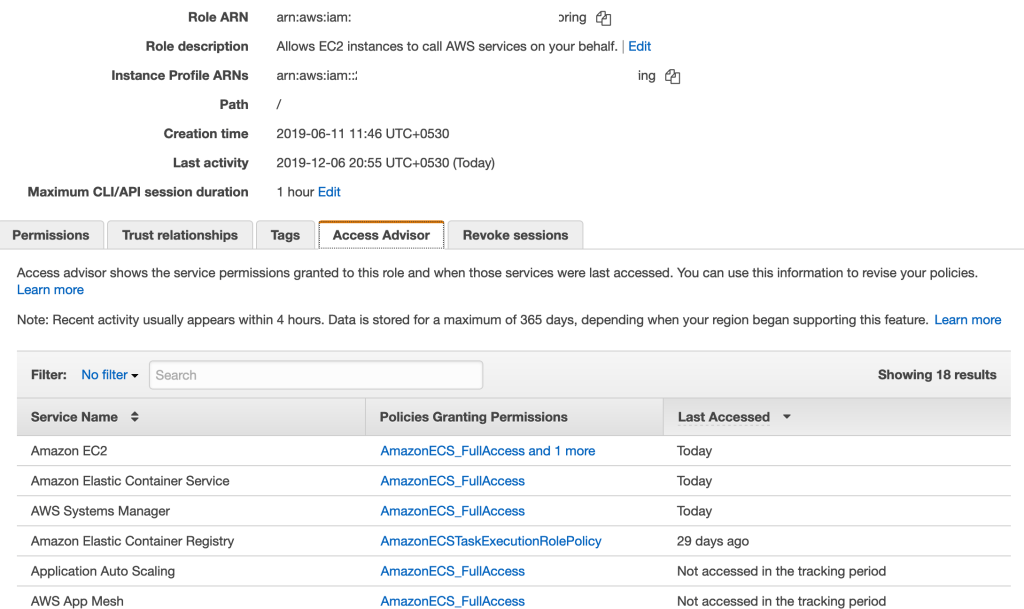
This is a pretty useful feature to look at all your IAM Roles and understand which ones are being actively used. And then drilling down to “Access Advisor” to find out which policies of the Role are being used. In the above example, it appears that Application Auto Scaling and App Mesh policies are not used by this Role and you can start invetigating if you really need these policies as part of the role.
Attribute Based Access Control
https://aws.amazon.com/blogs/security/simplify-granting-access-to-your-aws-resources-by-using-tags-on-aws-iam-users-and-roles/
We have been traditionally used to the concept of Role Based Access Control (RBAC). RBAC allows us to make sure we are able to provide access to users and machines based on their “Role”. On AWS, this is typically implemented through a combination of IAM Users, Roles and Groups.
For example, you could create IAM Groups such as “devs”, “admins”, “superadmins” with different set of IAM policies attached to them. You would then add users to those Groups and they automatically get relevant access.
While this model works in general, if you have lots of different projects and teams, it can get pretty complex to manage. For example, you will have users move from one project to another and they may need new set of permissions. You then end up creating newer set of policies and groups and this can go on for ever.
IAM recently introduced the ability to add “Tags” on IAM Principals – Users and Roles. With this, administrators can write simple policies based on “Tags” associated with the “Users” and the “Resources”.
As an example, let’s say you have a Tagging structure where EC2 resources are tagged with the key “team“. You could have a generic policy where you could allow “Users” to Start/Stop EC2 Instances only if the Instances have a Tag called “team” whose value matches the User’s Tag called “team”.
This can be achieved through a policy like:
    "Version": "2012-10-17",
    "Statement": [
        {
            "Effect": "Allow",
            "Action": [
                "ec2:DescribeInstances"
            ],
            "Resource": "*"
        },
        {
            "Effect": "Allow",
            "Action": [
                "ec2:StartInstances",
                "ec2:StopInstances"
            ],
            "Resource": "*",
            "Condition": {
                "StringEquals": {
                    "ec2:ResourceTag/team": "${aws:PrincipalTag/team}"
                }
            }
        }
    ]
}
This dramatically simplifies how you manage Policies at Scale where you no longer have to create different set of policies based on different use cases.
If you use a SAML based Identity Provider (such as Active Directory) to federate into AWS console and APIs, you could use attributes in your IdP to achieve the same. You could learn more about this here: https://aws.amazon.com/blogs/security/rely-employee-attributes-from-corporate-directory-create-fine-grained-permissions-aws/
If you want to learn more about this, watch this awesome session by Brigid Johnson:
IAM Access Analyzer
This is another example of how being on a large Cloud Platform like AWS automatically improves security for everyone. We earlier saw how you can identify usage of your IAM Roles. While IAM Roles gives temporary creds to access services, on the services side, you can apply policies (called as Resource Based Policies) to control who has access to services (such as S3, SQS) and what actions can they perform. With this, even if someone gets a credential through IAM Role to access a service, if the service’s policies do not allow access then those requests would fail.
So, Resource Based Policies are super important and you can find the list of supported services here.
While this is a great way to protect your services, how do you know that these policies are set the way you intended to be? How about these questions:
- I had created a S3 bucket and allowed Read access from another AWS account. Does that AWS account still have only Read access?
- I created an IAM Role for a federated user to assume when they log in using their SAML based IdP. This was few months ago. Are we sure nobody else has permissions to assume the Role now?
These are the kind of questions that you care about deeply. Validating this manually can be pretty daunting. That’s where IAM Access Analyzer can help.
Once enabled, IAM Access Analyzer continuously monitors resources (currently supports S3, SQS, IAM Roles, KMS and Lambda) and reports findings wherever a resource is accessed by a Principal outside the AWS account. The findings are provided within the IAM Console itself from where you can start taking actions. If you find the access to be as intended, you can simply “Archive” them. If you see some resources that looks suspicious, you can jump to respective consoles and take actions (such as turning off public access to your S3 bucket).
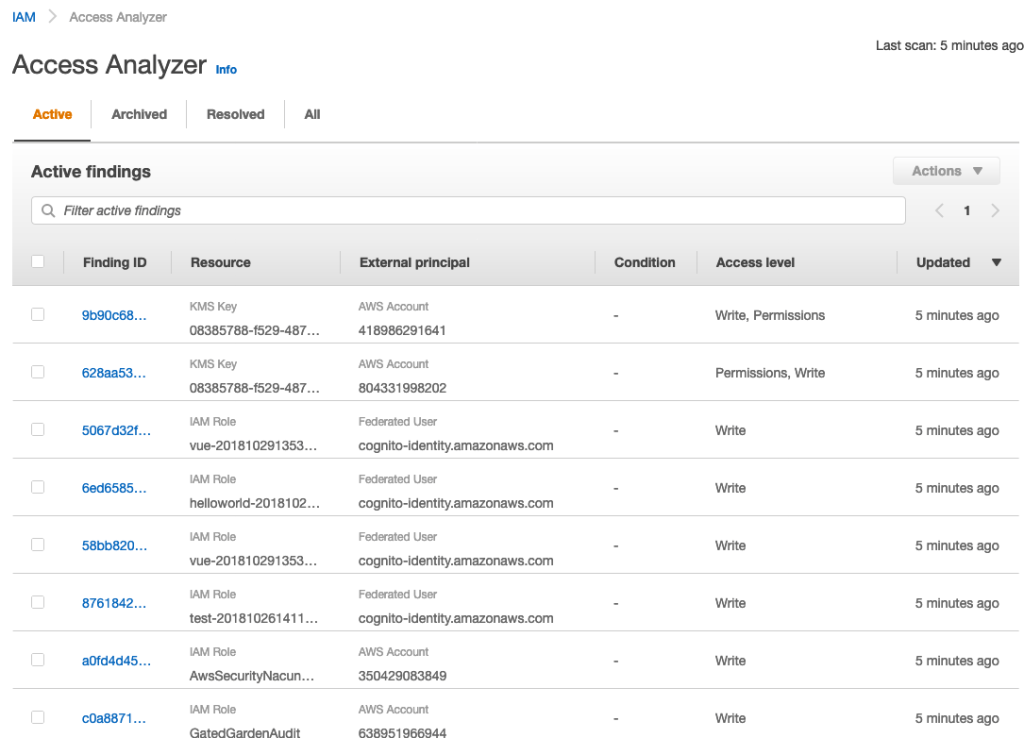
Here’s a detailed blog post on how you can use Access Analyzer to understand which of your S3 buckets have “Public Access” or access from other AWS accounts: https://aws.amazon.com/blogs/storage/protect-amazon-s3-buckets-using-access-analyzer-for-s3/
The best part of this feature: it doesn’t cost anything. And it can be turned ON in a click.
Instance Metadata Service V2
Instance Metadata Service (IMDS) is the internal service in AWS that provides temporary AWS credentials to EC2 Instances through the IAM Role that is attached to the Instance. From within an EC2 Instance, you can hit 169.254.169.254 to access the IMDS service.
This service has been available for more than 10 years now quietly working behind the scenes doing the heavy lifting of providing temporary, frequently rotated AWS credentials.
Earlier this year, Capital One had a breach where there was unauthorized access by an outsider who obtained Capital One’s customer data. This breach happened through a technique called SSRF (Server Side Request Forgery). You can read more details about this incident here.
This incident involved the EC2 IMDS. Once someone has access to an EC2 Instance with an attached IAM Role, you have access to the EC2 IMDS. Depending on the policies on the IAM Role attached to the EC2 Instance, you can start interacting with those AWS services. In Capital One’s case, the IAM Role seem to have had excessive permissions to S3 thereby allowing the attacker to download data from S3.
This isn’t pointing the blame at AWS. As AWS calls out , Security is a Shared Responsibility model where the customer equally owns the Security of the infrastructure that they are running.
However, AWS seems to have thought on how they can make it better and protect their customers. The effect of that is V2 of IMDS. In IMDS V2, there are additional protection to the service against attacks such as SSRF. Specifically, V2 provides:
- Protection against Open Reverse Proxies
- Protection against SSRF Vulnerabilities
- Protection against Open Layer 3 Firewalls and NATs
Using IMDS V2
- You can start using IMDS V2 by upgrading your AWS SDKs (that your apps running on EC2 use) to their latest version. The latest AWS SDKs automatically use IMDS V2
- In addition, there is a new CloudWatch metric called “
MetadataNoToken” for EC2 Instances. This is a new metric that tells you “the numer of times the IMDS was accessed through V1”. You can start monitoring this metric to understand how many Instances are still using V1 - Once the above metric becomes 0 (meaning all are using V2), you can have IAM Policies that blocks Instances being launched with V1 (essentially you can enforce usage of V2 only)
- CloudTrail also now records if the credentials were provided using V1 or V2
If you want to learn more about IMDS V2, read this blog post and this documentation.
AWS recommends that you start adopting V2. V1 will continue to be supported indefinitely and continues to be secure. However V2 provides additional protection. No harm in being more secure 🙂
Well those are the announcements that I found interesting in the security domain. Did I miss anything? Let me know in the comments.
 CloudStaq