
Tag: reinvent

  • AWS re:Invent | Beyond The Shiny New Toys | Containers

    AWS re:Invent | Beyond The Shiny New Toys | Containers

    This is part of the Beyond The Shiny New Toys series where I write about AWS reInvent 2019 announcements

    AWS ecosystem around containers is pretty large. It comprises of AWS’ own orchestration engine, managed Kubernetes control planes, serverless container platforms, ability to run large scale batch workloads on containers. And a whole lot of deep integrations with rest of the AWS ecosystem for storage, logging, monitoring, security to name a few.

    AWS re:Invent 2019 saw quite a few announcements around containers. These announcements further simplify deploying and managing container workloads. Here are some of them that I liked.

    AWS Fargate for Amazon EKS

    https://aws.amazon.com/blogs/aws/amazon-eks-on-aws-fargate-now-generally-available/

    When EKS was launched last year, we saw this coming eventually. And here it is. You can now launch Kubernetes Pods on AWS Fargate with absolutely no infrastructure to manage.

    With Amazon EKS, AWS offered a managed Kubernetes control plane. This definitely solved a major pain point of dealing with all the moving parts (etcd!) of the Kubernetes control plane. However, customers still had to manage the worker nodes (where containers actually run) of the cluster – such as scaling them, patching them or keeping them secure.

    AWS Fargate is a fully managed, serverless offering from AWS to run containers at scale. AWS completely manages the underlying infrastructure for your containers (like AWS Lambda). Similar to Lambda, you only pay based on the memory, CPU used by your containers and how long the container ran.

    Fargate Profile

    One of the aspects that I liked about this launch is “Fargate Profile”. With a Fargate Profile, you can declare which Kubernetes pods you would like to be run on Fargate and which ones on your “own” EC2 based worker nodes. You can selectively schedule pods through Kubernetes “Namespace” and “Labels”.

    This means, with a single Kubernetes control plane (managed by EKS), an administrator can selectively schedule Kubernetes pods between Fargate and “EC2” based worker nodes. For example, you could have your “test/dev” workloads running on Fargate and “prod” workloads (where you may need more control for security/compliance) running on EC2 based worker nodes.

    Here’s an example Fargate Profile:

    {
        "fargateProfileName": "fargate-profile-dev",
        "clusterName": "eks-fargate-test",
        "podExecutionRoleArn": "arn:aws:iam::xxx:role/AmazonEKSFargatePodExecutionRole",
        "subnets": [
            "subnet-xxxxxxxxxxxxxxxx",
            "subnet-xxxxxxxxxxxxxxxx"
        ],
        "selectors": [
            {
                "namespace": "dev",
                "labels": {
                    "app": "myapp"
                }
            }
        ]
    }

    With the above fargate profile, pods in the namespace “dev” with labels “app”:”myapp” will automatically get scheduled on Fargate. Rest of the pods will get scheduled on EC2 worker nodes.

    All without any changes from the developer perspective – they deal only with Kubernetes objects without polluting those definitions with any Fargate specific configurations. Kudos to the AWS container services team for coming with such a clean design.

    Note: AWS ECS also works on a similar model through Launch Types. However, ECS control plane is AWS propreitary and they would have all the freedom to offer something like this. Offering something similar to Kubernetes is truly commendable

    AWS Fargate Spot

    https://aws.amazon.com/blogs/aws/aws-fargate-spot-now-generally-available/

    I guess it’s self explanatory. You get “Spot Instances” type capabilities in Fargate now. With “Termination Notification” to your Tasks. This translates to significant cost savings for workloads that can sustain interruption. You can read more about it in the above blog. However, I have mentioned it here as it serves as a pre-cursor for the next couple of new features that we are going to look at.

    Amazon ECS Capacity Providers

    https://aws.amazon.com/about-aws/whats-new/2019/12/amazon-ecs-capacity-providers-now-available/

    Capacity Providers, as the name suggests deal with providing compute capacity for the containers running on ECS. Previously, for ECS clusters on EC2, customers typically deploy an AutoScalingGroup to manage (and scale) the underlying EC2 Capacity or use Fargate (you control through Launch Types). 

    With Capacity Providers, customers now have the ability to attach different Capacity Providers for both ECS on EC2 and ECS on Fargate. A single ECS Cluster can have multiple Capacity Providers attached to it. We can also create weights across Capacity Providers (through Capacity Provider Strategy) to distribute ECS Tasks between different Capacity Providers (such as On-demand and Spot Instances).

    That sounds a bit complicated? Why is AWS even offering this? What use cases does it solve? Let’s look at a few:

    Distribution between On-demand Spot Instances

    Let’s say you want to mix On-demand and Spot Instances in your cluster to maintain availability and derive cost savings. Your ECS Cluster can have two Capacity Providers – one comprising of an AutoScalingGroup1 with On-demand Instances and another comprising of an AutoScalingGroup2 with Spot Instances. You can then assign different weights between these Capacity Providers controlling how much percentage Spot Instances you are willing to utilize. In the below example, you have 30% Spot and 70% On-demand Instances by assigning weights 1 and 2 to respective Capacity Providers.
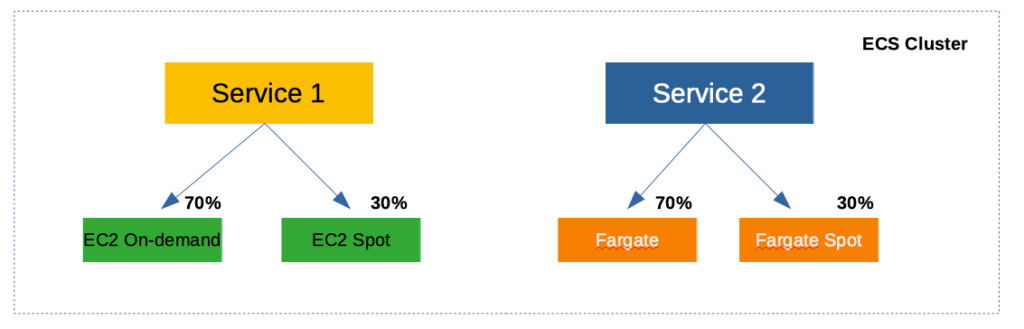
    A single ECS cluster having a mix of on-demand and spot capacity through Capacity Providers

    Fargate and Fargate Spot

    Just like EC2, Fargate also becomes a Capacity Provider for your cluster. Which means, you can extend the above concept to control how much Fargate Spot you would want in your cluster.

    Better spread across Availability Zones

    Extending the “weights” that you can assign to Capacity Providers, you can now get better spread of “ECS Tasks and Services” across Availability Zones. For example, you could create 3 Capacity Providers (each having an AutoScalingGroup tied to a single Availability Zone) with equal weights and ECS would take care of evenly spreading your Tasks.

    This wasn’t possible earlier because ECS and the underlying AutoScalingGroup weren’t aware of each other. Earlier, you would create a single AutoScalingGroup that is spread across multiple Availability Zones making sure the EC2 Instances are spread across AZs. However, when ECS scheduler runs your “Tasks” it doesn’t necessarily spread the “Tasks” evenly across AZs.

    Even spreading of “Tasks” through CapacityProviders is now possible as ECS can now manage the underlying AutoScalingGroup as well through “Managed Cluster Auto Scaling” (a new feature described below).


    ECS Managed Cluster Auto Scaling

    https://aws.amazon.com/about-aws/whats-new/2019/12/amazon-ecs-cluster-auto-scaling-now-available/

    Prior to the launch of this feature, ECS did not have the capability to manage the underlying AutoScalingGroup. You created the ECS cluster separately and the AutoScalingGroup for the underlying Instances separately. The AutoScalingGroup scaled based on the metrics of “tasks” (such as CPU) that are “already running” on the cluster.

    So what’s the challenge with this type of scaling?

    When you create your “Service” in ECS, you can setup AutoScaling for the service. For example, you can setup a Target Tracking Scaling Policy, that tracks the metrics of your running “Tasks” (of the Service) and scale the number of “Tasks” based on those metrics. This works similar to AutoScaling of EC2 Instances.

    However, what about the scenario when your “Service” on ECS scales, but there is insufficient underlying capacity as the EC2 AutoScalingGroup hasn’t scaled EC2 Instances yet? You see the disconnect?

    With “ECS Managed Cluster Auto Scaling”, this missing gap is now addressed. When your “Service” on ECS scales, ECS will dynamically adjust the “scaling policies” of the underlying EC2 AutoScalingGroup as well. Once EC2 scales and capacity is available, the “Tasks” would be automatically scheduled on them.

    Note: This is pretty similar to ClusterAutoScaler in Kubernetes where it works alongside HorizontalPodAutoScaler. When there are more “Pods” that needs to be scheduled and there is no available underlying capacity, ClusterAutoScaler kicks in and scales the capacity. Pods will eventually gets scheduled automatically once capacity is available.


    Closing Thoughts

    On the ECS front, Capacity Providers and Managed Cluster Auto Scaling make it much more powerful and provides more control and flexibility. On the other hand, it does add a bit of complexity from a developer perspective. It still doesn’t come close enough to simply launching a container and getting an endpoint that is highly available and scales automatically.

    On the EKS front, Fargate for EKS is the right step towards offering a “serverless” Kubernetes service. I liked the fact that you can continue to use Kubernetes “primitives” such as Pod/Deployment and you can control using “Fargate Profile” to selectively schedule Pods to Fargate. This is a different direction from GCP’s Cloud Run which can simply take a Container Image and turn it into an endpoint.

    I am assuming AWS will continue to iterate in this space and address all the gaps. Looking at the plethora of options available, it appears that AWS wants to address different types of container use cases coming out of its vast customer base.

    ECS Vs Kubernetes

    And looking at the iterations and features on ECS, it looks like ECS continues to see customer adoption despite the gaining popularity of Kubernetes. AWS doesn’t iterate on services when it doesn’t see enough customer adoption. Remember SimpleDB? Simple Work Flow? Elastic Transcoder? Amazon Machine Learning?

    Whenever they don’t see enough traction, AWS is quick to pivot to newer services and rapidly iterate (they would still operate and support older services). The continued iterations on both ECS and EKS front suggests that there is currently a market for both the orchestration engines. Only time would tell if it would be otherwise.


    Well those are the announcements that I found interesting in the area of Containers. Did I miss anything? Let me know in the comments.

  • AWS re:Invent | Beyond The Shiny New Toys | Networking

    AWS re:Invent | Beyond The Shiny New Toys | Networking

    This is part of the Beyond The Shiny New Toys series where I write about AWS reInvent 2019 announcements

    Networking in AWS has always been continuously evolving to support wide range of customer use cases. Back in the early days of EC2, all customer Instances were in a flat EC2 network called EC2-Classic (there is still documentation that talks about this). 10 years ago, AWS introduced VPC which fundamentally changed the way we think about Networking and it has rapidly accelerated the adoption of public cloud.

    Since the introduction VPC, the networking landscape within AWS started evolving pretty rapidly. You started getting capabilities such as VPC peering, NAT Gateways, Private endpoints for AWS services (such as S3, DynamoDB) within your VPC (so that traffic to those services do not leave your VPC). AWS also launched PrivateLink which allows your applications running in VPC securely access other applications (of yours and third party). And with their acquisition of Annapurna Labs, AWS started pushing the network capabilities even further such as 100Gbps networking, faster EBS-optimized performance, transparent hardware based encryption (almost nil performance overhead for your workloads).


    New Networking Capabilities

    While the AWS Networking stack continues to always improve through the year, reInvent 2019 had its fair share of announcements related to Networking. Here are some of the new features that I specifically found to be interesting.

    Transit Gateway Inter Region Peering

    https://aws.amazon.com/about-aws/whats-new/2019/12/aws-transit-gateway-supports-inter-region-peering/

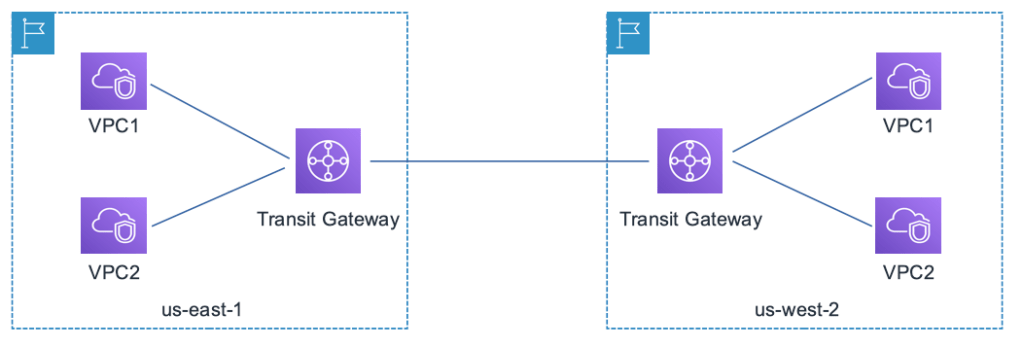
    AWS Transit Gateway allows you to establish a single gateway on AWS and connect all your VPCs, your datacenter (through a Direct Connect / VPN) and office locations (VPN). You no longer have to maintain multiple peering connections between VPCs. This changed your network topology to a Hub and Spoke model as depicted below

    So, if you have multiple VPCs that needs to connect to each other (and with on-premise data centers or branch offices), Transit Gateway simplifies the networking topology. However, if you are operating in multiple AWS regions (which most large customers do), and want to build a global network, then you need connectivity between the Transit Gateways.

    This type of cross region connectivity between Transit Gateways was not possible earlier. Now, with Transit Gateway peering, you can easily connect multile AWS regions and build a global network.

    Transit Gateway peering across AWS regions

    Traffic through the peering connection is automatically encrypted and is routed over the AWS backbone. This is currently available (at the time of writing) in US-East (N.Virginia), US-East(Ohio), US-West(Oregon), EU-Ireland EU-Frankfurt regions and I would expect AWS to roll this out globally based on customer demand.

    Building a Global Network

    Building a Global Network that spans across multiple AWS regions connecting your data center and branch offices have become simpler with the following services/features:

    There were also quite a few other features announced around reInvent 2019 that ups the game when it comes to building a scalable and reliable Global Network. Few notable mentions:

    • Accelerated Site-to-Site VPN: This uses the AWS Global Accelerator to route traffic through AWS edge locations and the AWS Global Backbone. Improves VPN performance from branch offices
    • Multicast workloads: Transit Gateway now supports multicast traffic between the attached VPCs. A feature asked by many large enterprises for running clusters and media workloads
    • Visualizing your Global Network: If you are building out such a complex Global Network, you would need a simpler way to visualize your network and take actions. The new Transit Gateway Network Manager allows you to centrally monitor your Global Network

    If you would like to understand more about various architecture patterns, check out this deep dive talk by Nick Mathews at re:Invent 2019.

    Application Load Balancer – Weighted Load Balancing

    When you are rolling out a new version of your app, you need some kind of strategy to transition users from the older version to the new version. Depending upon your needs, you employ techniques such as Rolling Deployments, Blue/Green Deployments or Canary Deployments.

    All of these techniques require some component in your infrastructure to selectively route traffic between the different versions. There are few ways in which you can do these in AWS today:

    • Using Route 53 DNS routing policy. For example, you can use Weighted Routing policy to control how much traffic is routed to each resource (having two different ALBs/ELBs running different versions of your app)
    • You could have different AutoScalingGroups attached to the same ALB and adjust the ASGs to shape your traffic

    With this new “Weighted Load Balancing” feature in ALB, you can achieve the same with one ALB.

    • You create multiple Target Groups with each having EC2 Instances running different versions of your app
    • Under the “Listeners” of your ALB, you add the “Target Groups” and assign different weights to different Target Groups

    Once you do the above, ALB would split the incoming requests based on the weights and route appropriate requests to each of the Target Groups.

    Migration Use Cases

    One other great use case for this feature is migration. Target Groups are not limited to just EC2 Instances. Target Groups can be EC2 Instances, Lambda functions, containers running ECS/EKS or even just IP addresses (say you have a VM in a data center). So, you can use this capability to even migrate from one environment to the other by gradually shifting traffic.

    If you would like to learn more about this new feature, check out this blog.

    Application Load Balancer – LOR Algorithm

    https://aws.amazon.com/about-aws/whats-new/2019/11/application-load-balancer-now-supports-least-outstanding-requests-algorithm-for-load-balancing-requests/

    The default algorithm that an Application Load Balancer (ALB) uses to distribute traffic is Round Robin. This fundamentally assumes that the processing time for all types of requests of your app is the same. While this may be true for most consumer facing apps, a lot of business apps have varying processing times for different functionalities. This would lead to some of the instances getting over utilized and some under utilized.

    ALB now supports Least Outstanding Requests (LOR) algorithm. If you configure your ALB with LOR algorithm, ALB monitors the number of outstanding request of each target and sends the request to the one with the least number of outstanding requests. If you have some targets (such as EC2 Instances) that are currently processing some long requests, they will not be burdened with more requests.

    This is available to all existing and new ALBs across all regions. A great feature!! There are some caveats too (such as how this would work with Sticky Sessions). Check out this documentation for more details.

    Better EBS Performance

    https://aws.amazon.com/about-aws/whats-new/2019/12/amazon-ec2-nitro-system-based-instances-now-support-36-faster-amazon-ebs-optimized-instance-performance/

    These are the things that I love about being on public cloud. Any EBS intensive workload, automatically gets better network throughput. At no additional cost. Without me doing anything. Just like that!!


    Well those are the announcements that I found interesting in the Networking domain. Did I miss anything? Let me know in the comments.
  • Beyond The Shiny New Toys | Redshift

    Beyond The Shiny New Toys | Redshift

    This is part of the Beyond The Shiny New Toys series where I write about AWS reInvent 2019 announcements

    Amazon Redshift has been going through a series of major changes which tremendously simplifies schema design and overall management of workloads. Here are some of the new features that were announced around the re:Invent 2019 timeframe that I specifically think a lot of customers (based on my earlier interaction with them) would look to put in use

    Materialized Views

    https://aws.amazon.com/about-aws/whats-new/2019/11/amazon-redshift-introduces-support-for-materialized-views-preview/

    This has been one of the most wanted asks from many customers who migrate from other DW systems into Redshift. Materialized Views (MV) have a significant improvement on query performance for repeated workloads such as Dashboarding, queries from BI tools or certain predictable steps in ETL pipelines.

    Till now, Redshift lacked support for MV and the recommendation has been to either modify your workloads or implement architectural changes such as performing a query rewrite using pg_bouncer

    You can now use the native MV (available in preview) capability to address such needs. There are some current limitations though. For example, you need to manually refresh the MV whenever your base tables undergo changes. Over time, I am sure AWS folks would address these limitations based on customer feedback. You can find the complete set current limitations here: https://docs.aws.amazon.com/redshift/latest/dg/mv-usage-notes.html

    Automated Table Sort

    https://aws.amazon.com/about-aws/whats-new/2019/11/amazon-redshift-introduces-automatic-table-sort-alternative-vacuum-sort/

    One of the most important best practices when it comes to Redshift is to keep the data Sorted. This would directly improve query performance as Redshift can read specific blocks of data (when your query has a filter) and also apply compression better. If your data is NOT sorted well enough, Redshift may read unwanted blocks and then later skip them in the memory. So, on incremental data loads, you had to earlier run “VACUUM SORT” command to make sure the data blocks are sorted.

    With this new feature, Redshift automatically performs the Sorting activity in the background without any interruption to query processing. However, if you do have large data loads, you may still want to run “VACUUM SORT” manually (as Automatic Sorting may take a while to fully Sort in the background).

    You can also monitor the “vacuum_sort_benefit” and “unsorted” columns in the SVV_TABLE_INFO table. Together, these columns tell you the following:

    1. What percentage of a particular table is “unsorted”
    2. How much percentage benefit would you derive by running “VACUUM SORT” against the table

    Check the following documentation for more details: https://docs.aws.amazon.com/redshift/latest/dg/t_Reclaiming_storage_space202.html#automatic-table-sort

    ALTER SORT KEY Dynamically

    https://aws.amazon.com/about-aws/whats-new/2019/11/amazon-redshift-supports-changing-table-sort-keys-dynamically/

    When you start using Redshift, you pick Distribution and Sort Keys for your tables. However, over time, as your workload evolves there may be a need to modify the Sort Keys that you originally picked. Previously, this meant, recreating your table with the new set of Sort Keys and loading all the data into that newly created table. This was required because, Redshift physically sorts the data in the underlying disks. Changing your Sort Keys meant re-sorting your data.

    With this new feature, you can now dynamically change the Sort Keys of your existing table. Redshift, behind the scenes will re-sort the data while your table continues to be available for querying. This provides more flexibility when it comes to schema design.

    Cross Instance Restore

    https://aws.amazon.com/about-aws/whats-new/2019/11/amazon-redshift-launches-cross-instance-restore/

    This is another important feature and one that has been long requested by customers. You may want to restore a snapshot of production DC2.8XL cluster into a smaller DC2.Large cluster for your test/dev purposes. Or you may have a DC2.Large cluster with many number of nodes. You have a snapshot of that cluster and wish to launch a cluster with smaller number of DC2.8XL cluster. This wasn’t possible until this capability was introduced.

    One of the important aspects that you want to consider when doing this exercise is to undersatnd how would your “target” cluster’s storage utilization on each node would look like. The following command in the AWS CLI would throw you some options to consider:

    aws redshift describe-node-configuration-options --snapshot-identifier <mycluster-snapshot> --region eu-west-1 -—action-type restore-cluster

    Automatic Workload Management

    https://aws.amazon.com/about-aws/whats-new/2019/09/amazon-redshift-announces-automatic-workload-management-and-query-priorities/

    This isn’t a re:Invent timeframe announcement as such. This was announced in September. But I am including it here because this is a big one and simplifies day to day operations of a Redshift cluster for an administrator.

    Even some of the large Redshift customers find it cumbersome to perform Workload Management (WLM) on Redshift. WLM on itself is a pretty deep topic and is something that you cannot avoid once your workloads start scaling on Redshift.

    WLM provides many controls for a Redshift administrator to manage different workloads and give better experience for all types of users of the system. Over the years, WLM has evolved from a static configuration to a dynamic configuration (of queues and memory) with Queue Priorities, Query Monitoring Rules, Queue Hopping, Short Query Acceleration and Concurrency Scaling.

    However all of these require someone to continuously observe the workloads on the cluster and keep tweaking these configurations. With Automatic WLM, Redshift removes much of these overheads from the administrator.

    With Automatic WLM, you still define Queues, Queue Priorities, User/Query Groups and configure Concurrency Scaling (for required Queues). Automatic WLM will then dynamically manage memory allocation and concurrency amongst these queues based on the workload. Automatic WLM also works with Short Query Acceleration allowing short running queries to complete.

    If you are managing WLM manually today, it might be worthwhile taking a look at this feature. You can read more about how Automatic WLM works here: https://docs.aws.amazon.com/redshift/latest/dg/automatic-wlm.html

    A few more noteworthy ones

    These are few more features that got added over the couse of 2019 – just ICYMI

    I believe with all these new capabilities, Redshift has now automated a whole lot of operations making administrators’ life simpler. Put it in typical Amazon way, Redshift now takes care of most of the “undifferentiated heavy lifting” 🙂

    Did I miss any new major announcement? What do you think about these features? Do let me know your thoughts in the comments section below.

  • AWS re:Invent|Beyond The Shiny New Toys |Redshift

    AWS re:Invent|Beyond The Shiny New Toys |Redshift

    This is part of the Beyond The Shiny New Toys series where I write about AWS reInvent 2019 announcements

    Redshift has been going through a series of major changes which tremendously simplifies schema design and overall management of workloads. Here are some of the new features that were announced around the re:Invent 2019 timeframe that I specifically think a lot of customers (based on my earlier interaction with them) would look to put in use.

    Materialized Views

    https://aws.amazon.com/about-aws/whats-new/2019/11/amazon-redshift-introduces-support-for-materialized-views-preview/

    This has been one of the most wanted asks from many customers who migrate from other DW systems into Redshift. Materialized Views (MV) have a significant improvement on query performance for repeated workloads such as Dashboarding, queries from BI tools or certain predictable steps in ETL pipelines.

    Till now, Redshift lacked support for MV and the recommendation has been to either modify your workloads or implement architectural changes such as performing a query rewrite using pg_bouncer

    You can now use the native MV (available in preview) capability to address such needs. There are some current limitations though. For example, you need to manually refresh the MV whenever your base tables undergo changes. Over time, I am sure AWS folks would address these limitations based on customer feedback. You can find the complete set current limitations here: https://docs.aws.amazon.com/redshift/latest/dg/mv-usage-notes.html

    Automated Table Sort

    https://aws.amazon.com/about-aws/whats-new/2019/11/amazon-redshift-introduces-automatic-table-sort-alternative-vacuum-sort/

    One of the most important best practices when it comes to Redshift is to keep the data Sorted. This would directly improve query performance as Redshift can read specific blocks of data (when your query has a filter) and also apply compression better. If your data is NOT sorted well enough, Redshift may read unwanted blocks and then later skip them in the memory. So, you choose a SORT Key for your table initially and on incremental data loads, you had to earlier run “VACUUM SORT” command to make sure the data blocks are sorted.

    With this new feature, Redshift automatically performs the sorting activity in the background without any interruption to query processing. However, if you do have large data loads, you may still want to run “VACUUM SORT” manually (as Automatic Sorting may take a while to fully Sort in the background).

    You can also monitor the “vacuum_sort_benefit” and “unsorted” columns in the SVV_TABLE_INFO table. Together, these columns tell you the following:

    1. What percentage of a particular table is “unsorted”
    2. How much percentage benefit would you derive by running “VACUUM SORT” against the table

    Check the following documentation for more details: https://docs.aws.amazon.com/redshift/latest/dg/t_Reclaiming_storage_space202.html#automatic-table-sort

    ALTER SORT KEY Dynamically

    https://aws.amazon.com/about-aws/whats-new/2019/11/amazon-redshift-supports-changing-table-sort-keys-dynamically/

    When you start using Redshift, you pick Distribution and Sort Keys for your tables. However, over time, as your workload evolves there may be a need to modify the Sort Keys that you originally picked. Previously, this meant, recreating your table with the new set of Sort Keys and loading all the data into that newly created table. This was required because, Redshift physically sorts the data in the underlying storage. Changing your Sort Keys meant re-sorting your data.

    With this new feature, you can now dynamically change the Sort Keys of your existing table. Redshift, behind the scenes will re-sort the data while your table continues to be available for querying. This provides more flexibility when it comes to schema design.

    Cross Instance Restore

    https://aws.amazon.com/about-aws/whats-new/2019/11/amazon-redshift-launches-cross-instance-restore/

    This is another important feature and one that has been long requested by customers. You may want to restore a snapshot of production DC2.8XL cluster into a smaller DC2.Large cluster for your test/dev purposes. Or you may have a DC2.Large cluster with many number of nodes. You have a snapshot of that cluster and wish to launch a cluster with smaller number of DC2.8XL cluster. This wasn’t possible until this capability was introduced.

    One of the important aspects that you want to consider when doing this exercise is to undersatnd how would your “target” cluster’s storage utilization on each node would look like. The following command in the AWS CLI would throw you some options to consider:

    aws redshift describe-node-configuration-options --snapshot-identifier <mycluster-snapshot> --region eu-west-1 -—action-type restore-cluster

    Automatic Workload Management

    https://aws.amazon.com/about-aws/whats-new/2019/09/amazon-redshift-announces-automatic-workload-management-and-query-priorities/

    This isn’t a re:Invent timeframe announcement as such. This was announced in September. But I am including it here because this is a big one and simplifies day to day operations of a Redshift cluster for an administrator.

    Even some of the large Redshift customers find it cumbersome to perform Workload Management (WLM) on Redshift. WLM on itself is a pretty deep topic and is something that you cannot avoid once your workloads start scaling on Redshift.

    WLM provides many controls for a Redshift administrator to manage different workloads and give better experience for all types of users of the system. Over the years, WLM has evolved from a static configuration to a dynamic configuration (of queues and memory) with Queue Priorities, Query Monitoring Rules, Queue Hopping, Short Query Acceleration and Concurrency Scaling.

    However all of these require someone to continuously observe the workloads on the cluster and keep tweaking these configurations. With Automatic WLM, Redshift removes much of these overheads from the administrator.

    With Automatic WLM, you still define Queues, Queue Priorities, User/Query Groups and configure Concurrency Scaling (for required Queues). Automatic WLM will then dynamically manage memory allocation and concurrency amongst these queues based on the workload. Automatic WLM also works with Short Query Acceleration allowing short running queries to complete.

    If you are managing WLM manually today, it might be worthwhile taking a look at this feature. You can read more about how Automatic WLM works here: https://docs.aws.amazon.com/redshift/latest/dg/automatic-wlm.html

    A few more noteworthy ones

    These are few more features that got added over the couse of 2019 – just ICYMI

    I believe with all these new capabilities, Redshift has now automated a whole lot of operations making administrators’ life simpler. Put it in typical Amazon way, Redshift now takes care of most of the “undifferentiated heavy lifting” 🙂


    Well those are the Redshift announcements that I found interesting. Did I miss anything? Let me know in the comments.

  • Beyond The Shiny New Toys

    Beyond The Shiny New Toys

    This is one of my favorite time of the year when it comes to AWS. Yes, the time around re:Invent where AWS launches a whole bunch of new Services and Features. Over the years, it has become a bit of overwhelming for me with the sheer number of announcements. Last year, during the week of re:Invent 2018 AWS announced about 100 major new Services and Features. This year AWS has gone one step further with pre:Invent. More than 100 new Features/Services already announced in the two weeks run up to re:Invent 2019.

    At every re:Invent, AWS continues to push the platform forward with some amazing innovative services. Nobody imagined that AWS would drive a truck to your datacenter. And who thought you could get a Ground Station at a click of a button? May be this year (I am writing this post a week before re:Invent) they would launch a service for “Inter Planetary Travel”. Or a feature in Sagemaker that builds an AWS service automatically from your thoughts.

    Jokes apart, AWS would continue to innovate at a rapid clip on behalf of cutsomers and it is super exciting to see all these services coming our way. At the same time, these are shiny new toys that address some very specific use cases. What majority of the customers end up adopting are the Features & Services released in the areas of “fundamental building blocks”. These are in the areas of Compute, Storage, Networking, Secuirty, Analytics, Management Tools and Cost Optimization that are core to most workloads that businesses run on the Cloud.

    This series of posts focus on new Services and Features in these building blocks. I will try to collate as much as possible from the rampage of announcements under specific topics. As I add more posts, I will also collate them and list them here so that this post becomes a “master” post by itself.

  • AWS re:Invent | Beyond The Shiny New Toys

    AWS re:Invent | Beyond The Shiny New Toys

    This is one of my favorite time of the year when it comes to AWS. Yes, the time around re:Invent where AWS launches a whole bunch of new Services and Features. Over the years, it has become a bit of overwhelming for me with the sheer number of announcements. Last year, during the week of re:Invent 2018 AWS announced about 100 major new Services and Features. This year AWS has gone one step further with pre:Invent. More than 100 new Features/Services already announced in the two weeks run up to re:Invent 2019.

    At every re:Invent, AWS continues to push the platform forward with some amazing innovative services. Nobody imagined that AWS would drive a truck to your datacenter. And who thought you could get a Ground Station at a click of a button? May be this year (I am writing this post a week before re:Invent) they would launch a service for “Inter Planetary Travel”. Or a feature in Sagemaker that builds an AWS service automatically from your thoughts.

    Jokes apart, AWS would continue to innovate at a rapid clip on behalf of cutsomers and it is super exciting to see all these services coming our way. At the same time, these are shiny new toys that address some very specific use cases. What majority of the customers end up adopting are the Features & Services released in the areas of “fundamental building blocks”. These are in the areas of Compute, Storage, Networking, Secuirty, Analytics, Management Tools and Cost Optimization that are core to most workloads that businesses run on the Cloud.

    This series of posts focus on new Services and Features in these building blocks. I will try to collate as much as possible from the rampage of announcements under specific topics. As I add more posts, I will also collate them and list them here so that this post becomes a “master” post by itself.